108 CHAPTER 5: CONFIGURING THE ROUTER
RIP RIP (Routing Information Protocol) - RIP allows the network administrator
to set up routing information on one RIP-enabled device (this Router),
and send that information to all RIP-enabled devices on the network.
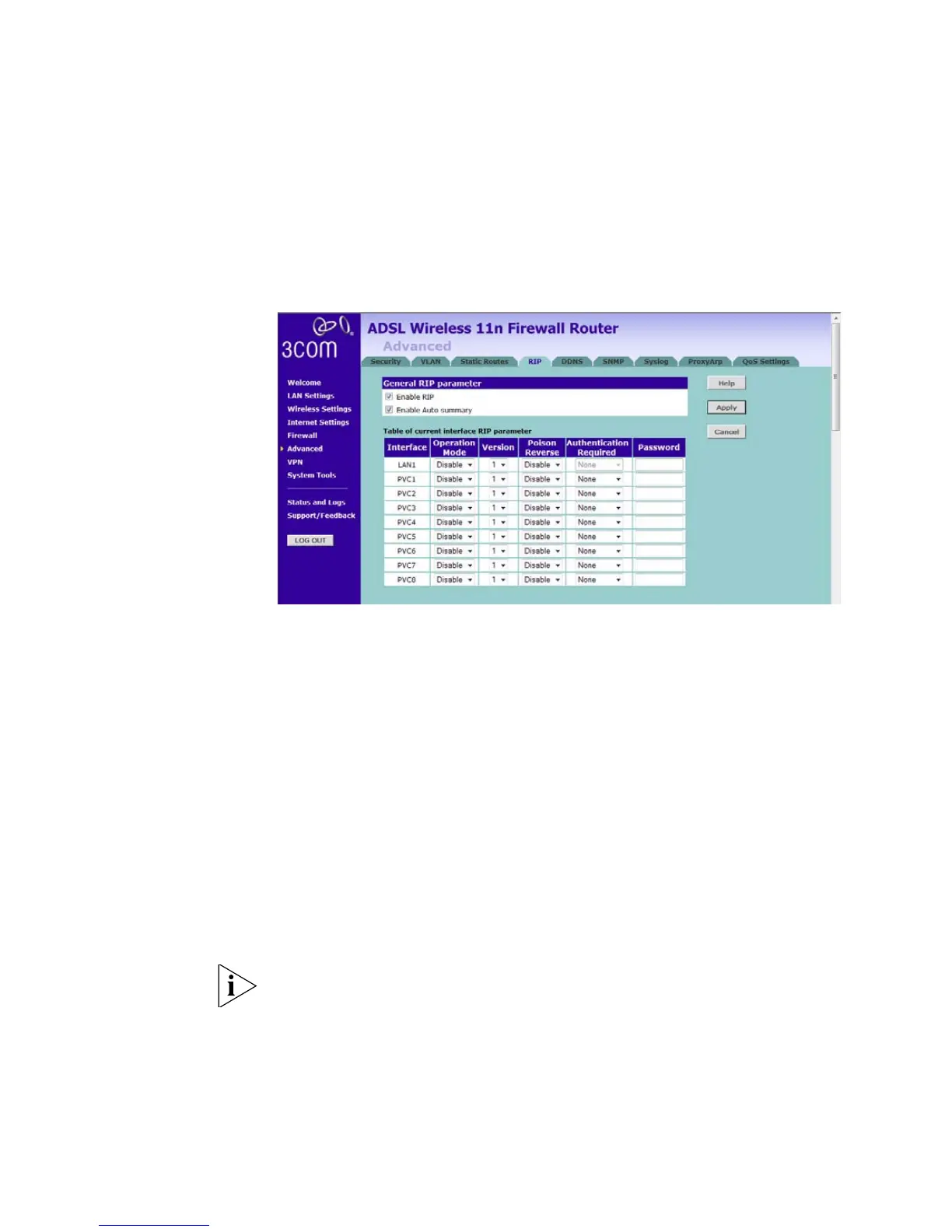
Figure 85 RIP Parameter Screen
You can set up RIP independently on both LAN and WAN interfaces.
1 Check the Enable RIP checkbox.
2 Check the Enable Auto summary checkbox. Auto summarization sends
simplified routing data to other RIP-enabled devices rather than full
routing data.
3 Select the Operation Mode:
■ Disable — RIP is not enabled for the WAN or LAN interface.
■ Enable — RIP is enabled for the WAN or LAN interface. The router will
transmit RIP update information to other RIP-enabled devices.
■ Silent — RIP is enabled, however the Router only receives RIP update
messages, it will not transmit any messages itself.
4 In the Version field, select 1 or 2.
3Com recommends that you only use RIPv1 if there is an existing
RIP-enabled device on your network that does not support RIPv2. In all
other cases, you should use RIPv2.






 To Next Page