CONNECT
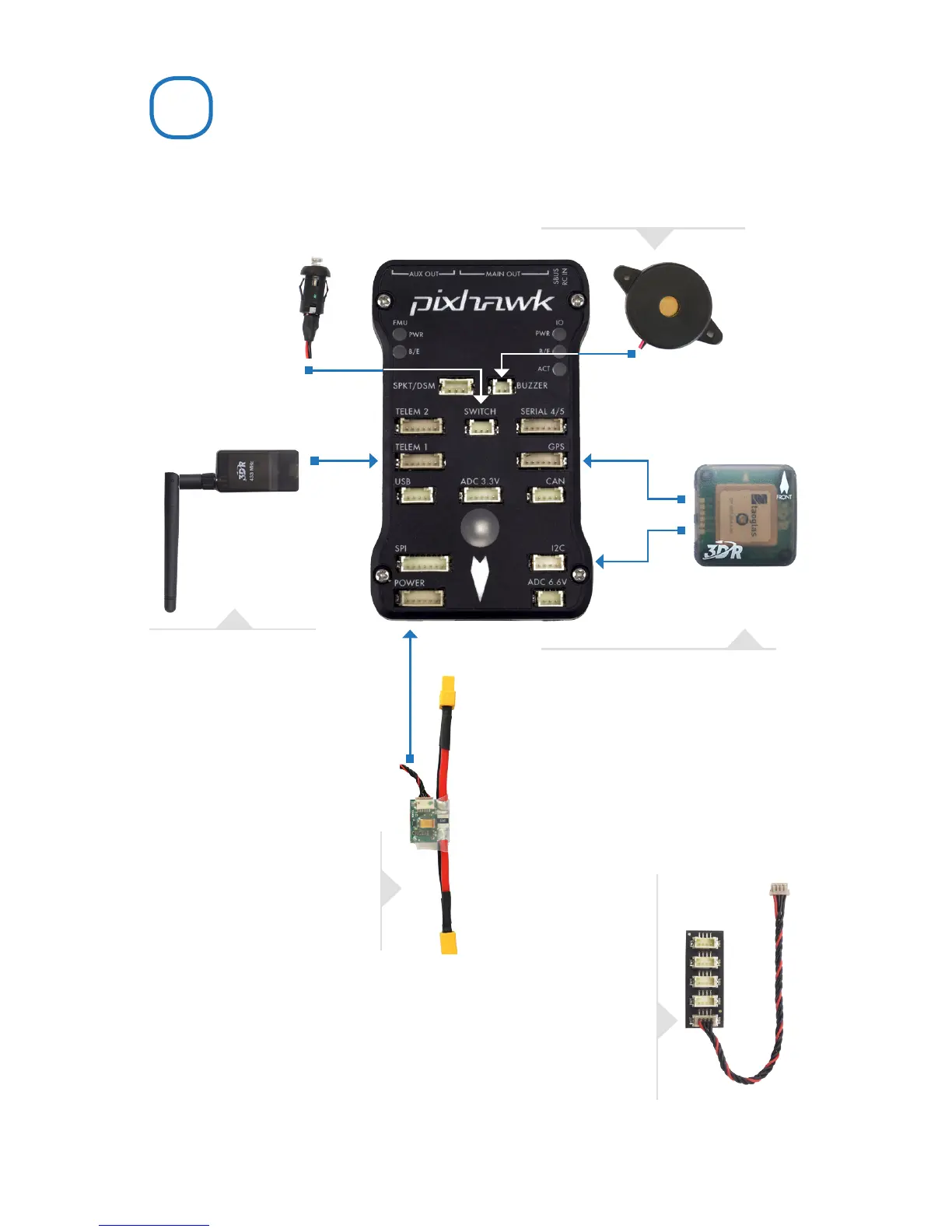
(Required) Connect the buzzer
and safety switch.
(Optional) Connect a 3DR
Radio to Pixhawk’s Telem
port using the 6-wire cable
provided with your 3DR Radio
Kit to receive data and
communicate with
the autopilot in flight.
(GPS or GPS+Compass required)
Connect a 3DR GPS+Compass to
provide the autopilot with positioning
data during flight. This kit includes a
6-wire cable to connect the GPS ports.
Connect the MAG to the I
2
C port using
the 4-wire cable provided with the 3DR
GPS+Compass.
(Required) Connect the 3DR
Power Module to the Power port
using the 6-wire cable to direct
power from your lithium polymer
(LiPo) battery to the autopilot.
(Optional) The I
2
C splitter expands the I
2
C port to allow up
to four additional peripherals to connect to Pixhawk. Use the
4-wire cable to connect the I
2
C splitter and add a compass
module, external LED, digital airspeed sensor, or other
peripherals to your vehicle.
2


 To Next Page