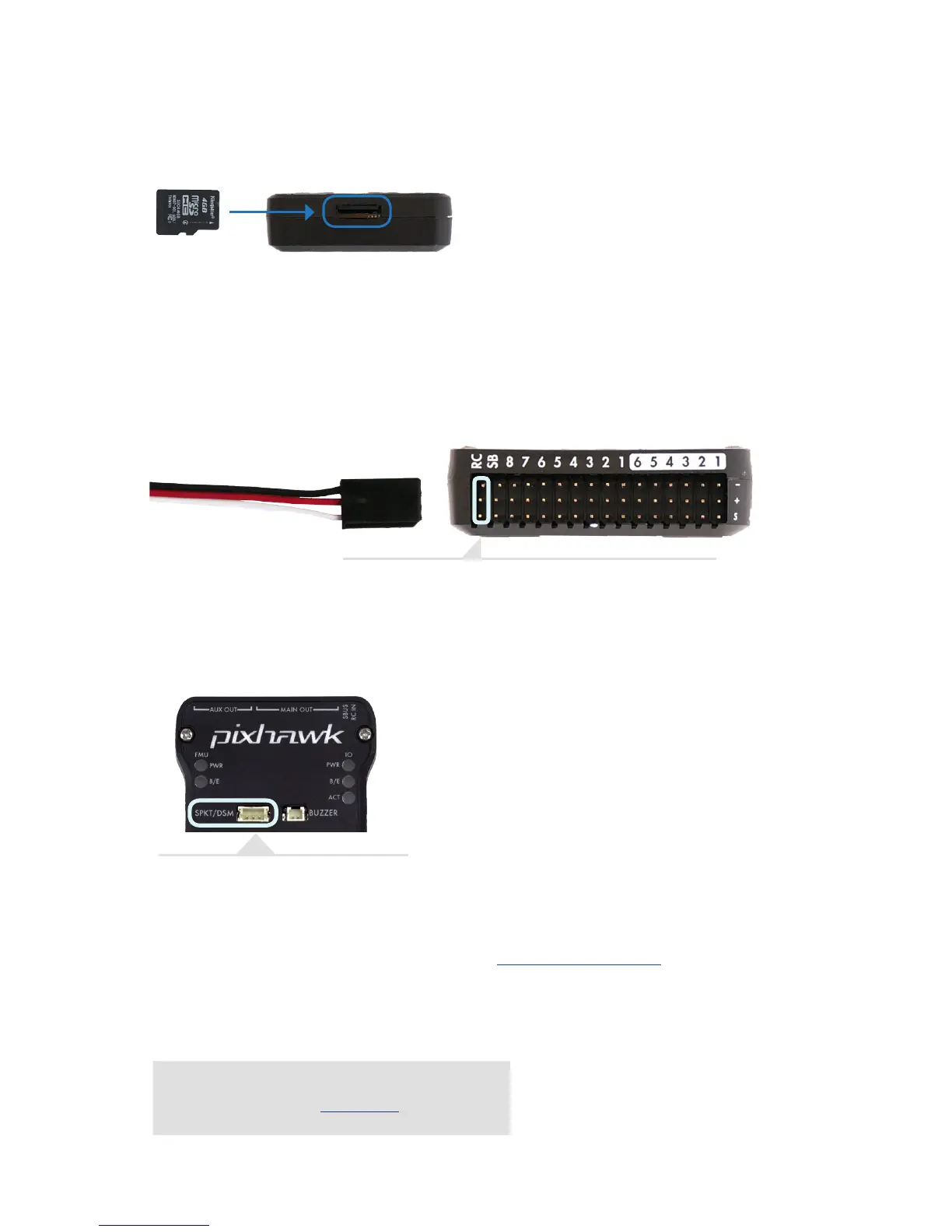
Connect the ground (-), power (+), and signal (S) wires to the RC
pins using the provided 3-wire servo cable.
For a Spektrum DSM, DSM2, or DSM-X Satellite RC receiver, connect to
the SPKT/DSM port.
CONNECT RADIO CONTROL
FOR PPM RC RECEIVERS AND FUTABA S.BUS RECEIVERS
FOR SPEKTRUM SATELLITE RECEIVERS
FOR PWM RECEIVERS
Purchase a PPM Encoder module to connect a PWM
RC receiver to Pixhawk at store.3dr.com.
LOAD SD CARD INTO PIXHAWK
If the SD card is not preloaded into Pixhawk, insert the micro-SD card into the slot at the
bottom end of the board.
For a complete list of RC systems compatible with Pixhawk, visit the APM wiki page here.


 To Next Page