1. My Pen won’t turn on!
(Light doesn’t turn on)
A. Is the Power Adapter plugged into a working power outlet?
If you have a spare power adapter around the house please
use it to test your 3Doodler Create+. This will help determine if
the problem is with your 3Doodler Create+ or with the Power
Adapter provided in the box.
C. Make sure the Control
Switch on your 3Doodler
Create+ is not set to OFF.
3. My Plastic is not extruding from
my 3Doodler Create+.
3A. Plastic not engaging properly with the Drive Gear:
Gently push until you feel the strand pulled through the Drive
Gear on its own.
If the above does not work, reverse the Plastic fully from the Pen.
(See Section 2, Step 6) Snip ends, then reinsert and try again.
If Plastic is too short to be removed from the Pen, move to 3B.
3B. Plastic is too short to be removed from the Pen:
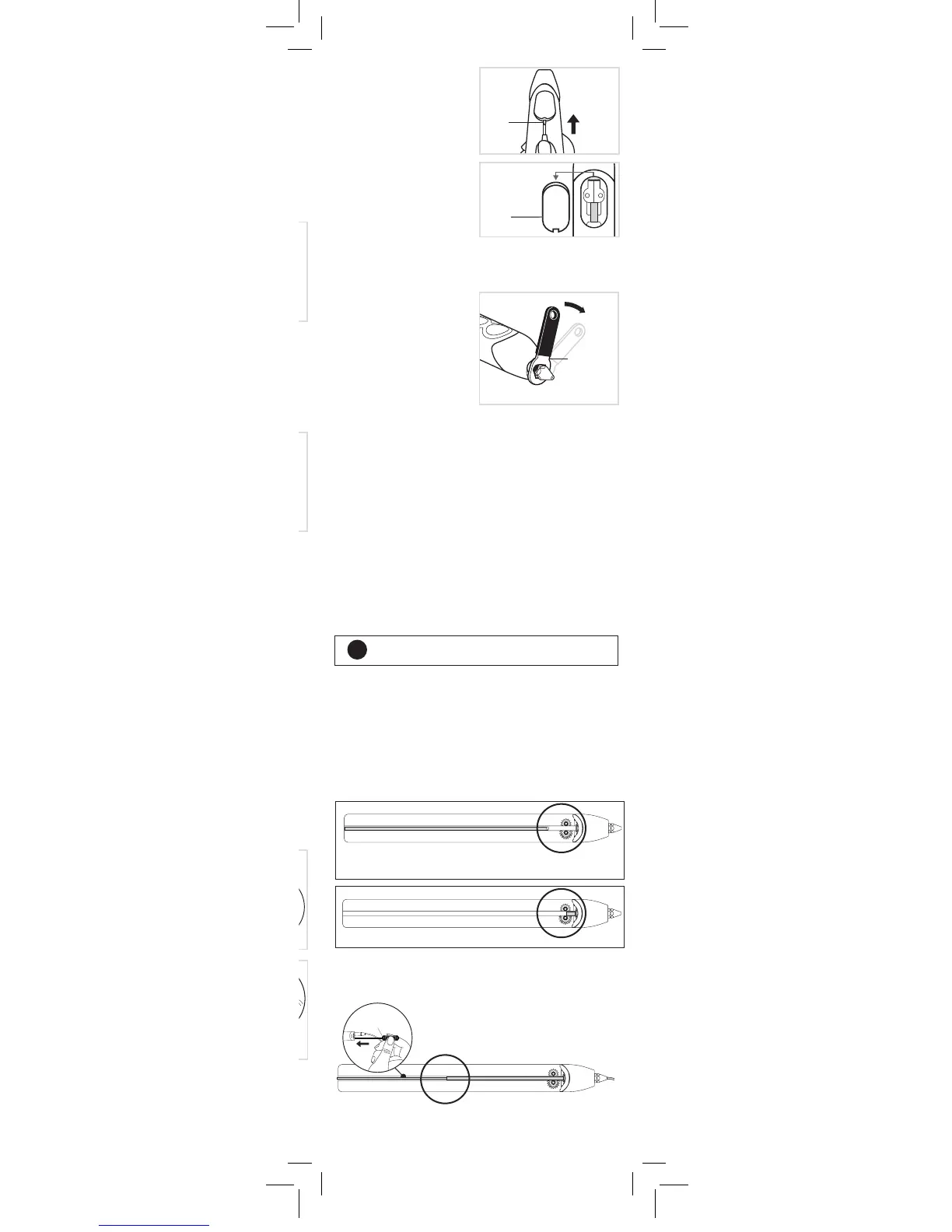
Nozzle may loosen with
continued usage (or in transit).
While Pen is hot (BLUE or
GREEN Light on), gently turn
Nozzle clockwise to tighten
it using the Mini Spanner
provided. Stop tightening once
you rst feel resistance so as
to avoid over-tightening the
Nozzle and breaking it.
A. Click either the FAST or SLOW button once.
B. If Step A does not solve this problem, please unplug your
3Doodler Create+ and then plug it in and try again.
5. My Plastic won’t stop extruding.
4. My Plastic is leaking from
around the Nozzle.
While the Pen is on and hot (BLUE or GREEN Light), double click
either the FAST or SLOW button. Light will start ashing to signal
the Plastic is reversing. Once the Plastic stops reversing, it is safe
to remove it from the Pen by gently pulling on the back of the
strand.
If Plastic is too short to reverse, see Section 3, Step 3B.
6. How do I reverse my
unused Plastic?
Snip the ends of your Plastic now for easier loading
and Doodling later.
It is possible that the Plastic is either too short to reverse all the
way out of your 3Doodler Create+, or that the Plastic has moved
past the Pen’s Drive Gear system.
You will be able to check for these issues by looking through the
Maintenance Cover.
7. I have reversed my Plastic but
cannot get it out.
For both of these issues, you can try the following options:
• Insert a new strand of Plastic or Unblocking Tool to push the
remaining Plastic through while Pen is ON and extruding.
Plastic reversed, but too short to take out and no longer in
contact with the Drive Gear.
TIP
Mini
Spanner
Plastic is beyond Drive Gear.
Or
• While using the Reverse feature of the 3Doodler Create+, remove
Nozzle and use Unblocking Tool to push Plastic out the back of
the Pen. (See Section 3, Step 3B).
Unblocking Tool
3Doodler_Bob_User_Manual_MAIN_Inner_20180511.indd 10 11/5/2018 11:37 AM


 To Next Page