EasyManua.ls Logo

3M 10800 - User Manual

3M 10800
50 pages
Print Icon
To Next Page IconTo Next Page
Loading...
NA - ENG
April 2017
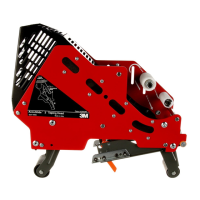
3M-Matic
Accuglide 3 - 2 Inch Taping Head
Page i
Instructions and Parts List
Important Safety Information
BEFORE INSTALLING OR OPERATING THIS EQUIPMENT
Read, understand and follow all safety and operating instructions.
Spare Parts
It is recommended you immediately order the spare parts listed in the “Spare
Parts/Service Information” section. These parts are expected to wear through
normal use, and should be kept on hand to minimize production delays.
3M-Matic
Accuglide
3
Type 10800
Upper and Lower
High Speed Taping Heads
2 Inch
Serial #:
For reference, record machine serial number here.

Questions and Answers

  • T
    tateedwardAug 1, 2025
    What to do if the blade does not cut tape on my 3M 10800 Power Tool?
    • T
      Thomas SchroederAug 1, 2025
      If the blade of your 3M Power Tool doesn't cut tape, or the tape end looks jagged or shredded, here are a few things to check: * The blade might be dull or have broken teeth, so replace it. * The tape tension could be too low; increase it by adjusting the one-way tension roller. * Adhesive buildup on the blade can be cleaned and adjusted. * Ensure the blade is correctly positioned, bottomed out against the mounting bolts. * The blade might be dry, so lubricate the oiler pad on the blade guard. * Make sure the beveled edge of the blade faces away from the head's entrance. * Replace any missing or stretched cutter springs. * Ensure the tension roller surface fully contacts the taping head frame; press the one-way bearing further into the roller or replace it if necessary.
  • T
    Tara MurrayAug 15, 2025
    How to fix too long of a tape leg on the 3M 10800 case?
    • D
      don61Aug 15, 2025
      If the tape leg on the front of your 3M Power Tool case is too long, consider the following: * Ensure the tape is threaded correctly, going around the wrap roller before the one-way tension roller. * Adjust the one-way tension roller if the tape tension is too low. * Check for adhesive buildup between the knurled roller and its shaft; clean and lubricate the shaft. * Adjust the tape web alignments if the tape tracks to one side or drags on the support tabs of the applying frame. * Position the one-way tension roller correctly in its mounting slot so that the tape extends just beyond the centerline of the applying roller. * Check the leg length adjustments to ensure the taping head is set up properly.

Summary

Warranty

Equipment Warranty and Limited Remedy

Details the limited warranty provided by 3M for the taping head parts.

Limitation of Liability

Outlines the extent of 3M's liability regarding the use of the equipment.

Important Safeguards

Explanation of Signal Word and Possible Consequences

Clarifies the meaning of safety symbols and their potential outcomes.

General Safety Warnings and Precautions

Lists critical safety instructions and precautions for operating and servicing the equipment.

Installation

Operation

Tape Loading - Upper Taping Head

Step-by-step guide for loading tape into the upper taping head.

Tape Loading - Lower Taping Head

Step-by-step guide for loading tape into the lower taping head.

Maintenance

Blade Replacement

Instructions for safely replacing the cutting blade on the taping head.

Adjustments

Troubleshooting

Spare Parts;Service Information

3M 10800 Specifications

General IconGeneral
Brand3M
Model10800
CategoryPower Tool
LanguageEnglish

Related product manuals