11
GB English
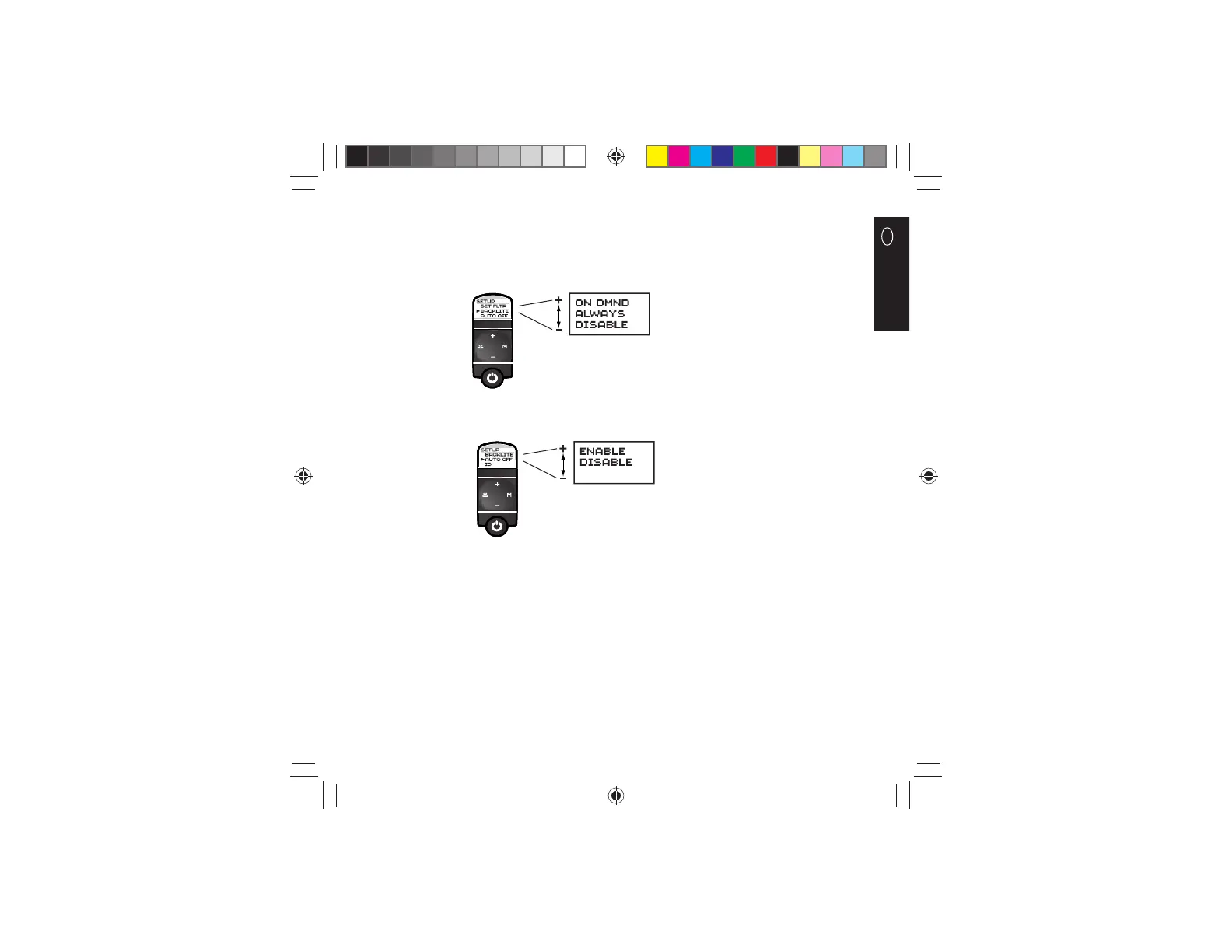
To select the backlight setting: Select the BACKLITE option in the Setup menu. Use the (-) and (+) buttons to scroll
through the list of options. Press and release the (M) button to select. The factory default is ALWAYS. The ALWAYS option will
illuminate the backlight at all times at a reduced level while the stethoscope is powered on and not in standby mode. The ON
DMND option will illuminate the backlight for fi ve seconds by depressing and releasing the power button. The DISABLE option
disables the backlight at all times and will conserve power.
To select Auto Off power management: Select the AUTO OFF option in the Setup menu. Use the (-) and (+) buttons to scroll
through the list of options. Press and release the (M) button to select. The factory default is ENABLE.
Two different settings work together to infl uence the length of time the Model 3100 is on full power: The AUTO OFF setting
(ENABLE vs. DISABLE) and the POWER setting (HIGH, MEDIUM, and LOW - HIGH setting uses more battery power, LOW setting
uses less battery power). To increase battery life, ENABLE the Auto Off feature and select the LOW power setting.
34870378097.indd 1134870378097.indd 11 12/17/09 4:31:05 PM12/17/09 4:31:05 PM










 To Next Page