3M
™
Pocket Projector MPro150
© 2009 3M. All Rights Reserved.
5
Projection Mode
Mode de projection • Projektionsmodus • Modo proyección •
Modalità proiezione • Projectiemodus • Visningsläge •
投影模式 • 投影模式 • 投影モード
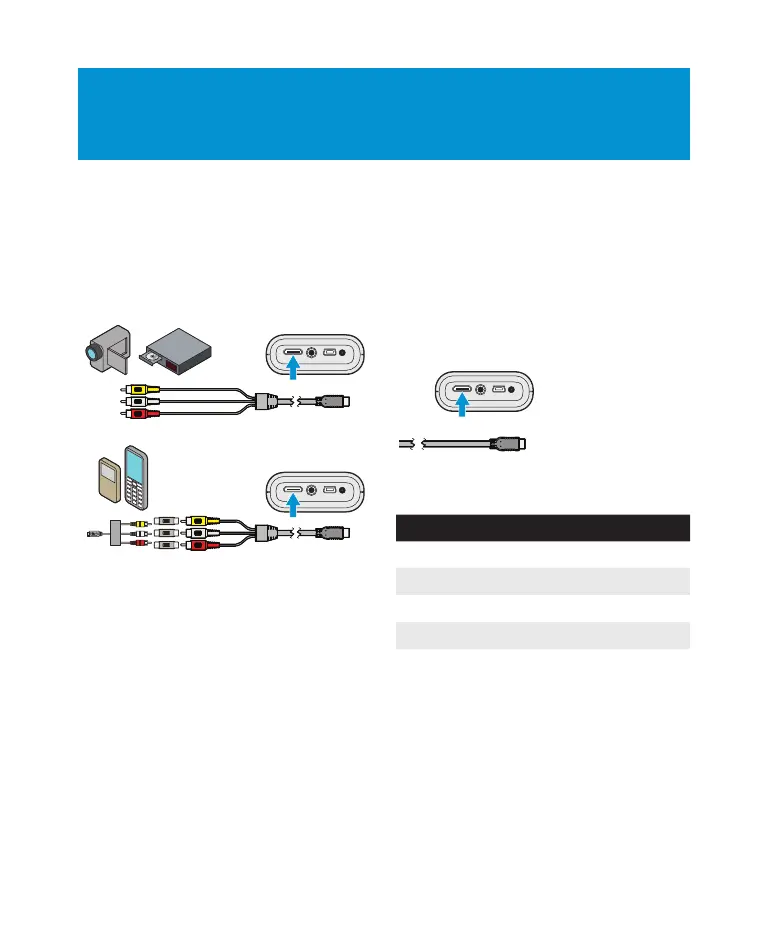
Connect a Video Source
Connexion d’une source vidéo • Eine Videoquelle
anschließen • Conecte una fuente de video •
Collegare a una sorgente video • Een videobron
aansluiten • Anslut en video • 连接视频源 •
連接視訊源 • ビデオソースの接続
Note: Some devices require a special cable to connect to the
projector.
Remarque: Certains dispositifs nécessitent un câble spécial pour
effectuer le branchement au projecteur.
Hinweis: Einige Geräte erfordern ein besonderes Kabel für den
Anschluss an den Projektor.
Note: Algunos dispositivos requieren un especialCable para
conectar el proyector.
Nota: Alcuni dispositivi richiedono un cavo speciale per il
collegamento al proiettore.
Opmerking: Sommige apparaten hebben een speciale kabel nodig
om te kunnen worden aangesloten op de projector.
OBS: Vissa enheter kräver speciella kablar för anslutning till
projektorn.
注意: 一些设备需要一条特殊的电缆,以连接到投影
机上。
注意: 一些設備需要一條特別的電纜,以連接到該投
影機。
メモ: デバイスの中には、プロジェクターに接続する特別
なケーブルを必要とするものがあります。
Connect a Computer
Connexion d’un ordinateur • Einen Computer
anschließen • Conectar un ordenador •
Collegare un computer • Aansluiten op een
computer • Anslut en dator • 连接电脑 •
連接電腦 • コンピュータの接続
Description Resolution Refresh Rate
VGA 640 x 480 60 Hz
SVGA 800 x 600 60 Hz
XGA 1024 x 768 60 Hz
WXGA 1280 x 768 60 Hz
14762-PSD_78-6971-1517-4_MPRo_150_QSG.indd 5 11/20/09 2:23 PM


 To Next Page