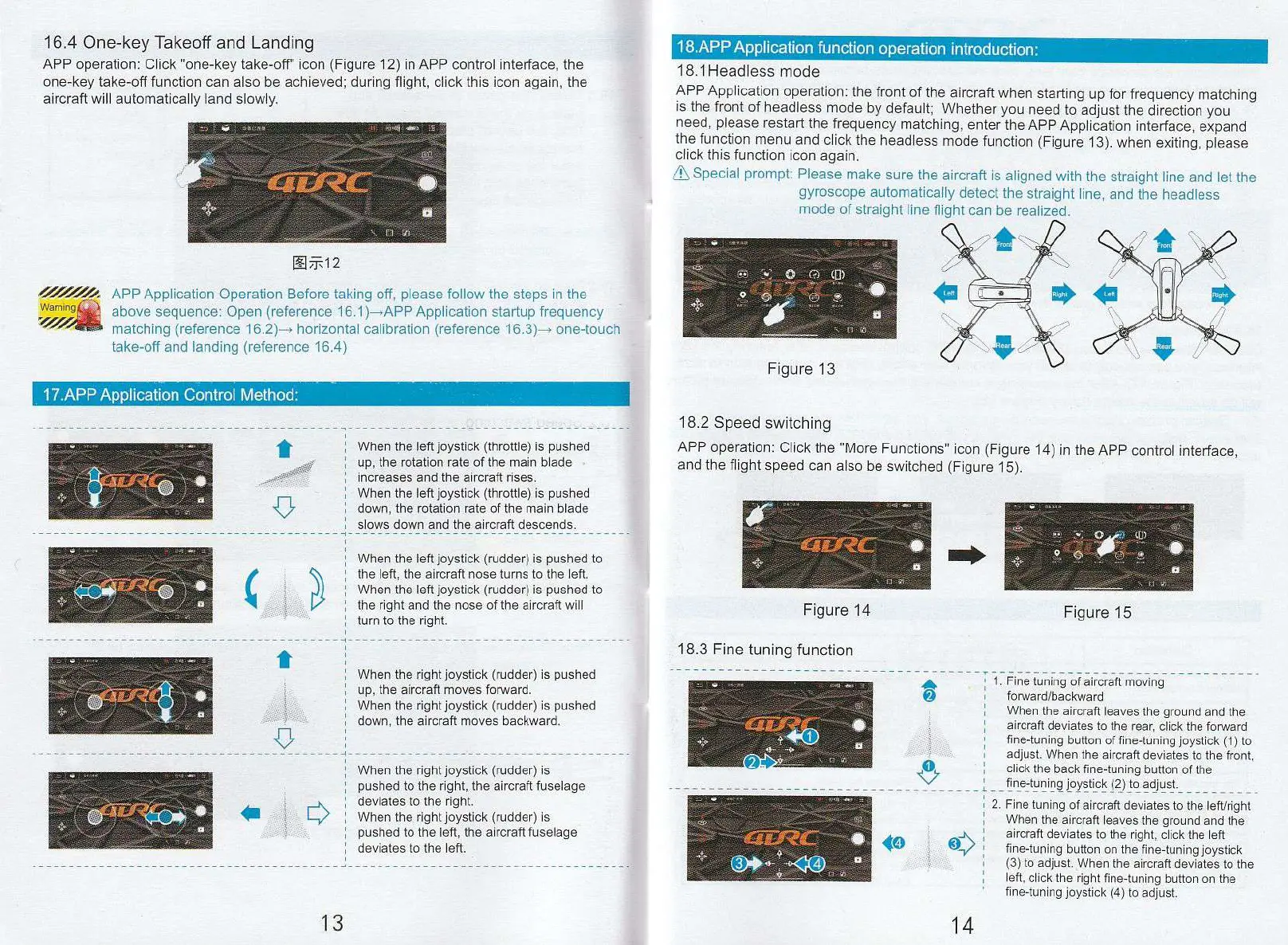
Figure 13
Figure 15
Figure 14
1.
Fine tuning of aircraft moving
forward/backward
When the aircraft leaves the ground and the
aircraft deviates to the rear, click the forward
fine-tuning button of fine-tuning joystick (1) to
adjust. When the aircraft deviates to the front,
click the back fine-tuning button of the
fine-tuning joystick (2) to adjust.
2.
Fine tuning of aircraft deviates to the left/right
When the aircraft leaves the ground and the
aircraft deviates to the right, click the left
fine-tuning button on the fine-tuning joystick
(3) to adjust. When the aircraft deviates to the
left, click the right fine-tuning button on the
fine-tuning joystick
(4)
to adjust.
16.4 One-key Takeoff and Landing
APP operation: Click "one-key take-off' icon (Figure 12) in APP control interface, the
one-key take-off function can also be achieved; during flight, click this icon again, the
aircraft will automatically land slowly.
1117
-
1712
APP
Application Operation Before taking off, please follow the steps in the
w
•
arni
ng
above sequence: Open (reference 16.1)—•APP Application startup frequency
///
-
matching (reference 16.2)-4 horizontal calibration (reference 16.3)—> one-touch
take-off and landing (reference 16.4)
17.APP Application Control Method:
When the left joystick (throttle) is pushed
up, the rotation rate of the main blade
increases and the aircraft rises.
When the left joystick (throttle) is pushed
down, the rotation rate of the main blade
slows down and the aircraft descends.
18.APP Application function operation introduction:
18.1Headless mode
APP
Application operation: the front of
the aircraft when starting up for frequency matching
is the front of headless mode by default; Whether you need to adjust the direction you
need, please restart the frequency matching, enter the APP Application interface, expand
the function menu and click the headless mode function (Figure 13). when exiting, please
click this function icon again.
Special prompt: Please make sure the aircraft is aligned with the straight line and let the
gyroscope automatically detect the straight line, and the headless
mode of straight line flight can be realized.
18.2 Speed switching
APP operation: Click the "More Functions" icon (Figure 14) in the APP control interface,
and the flight speed can also be switched (Figure 15).
18.3 Fine tuning function
When the right joystick (rudder) is
pushed to the right, the
aircraft
fuselage
deviates to the right.
When the right joystick (rudder) is
pushed to the left, the aircraft fuselage
deviates to the left.
When the left joystick (rudder) is pushed to
the left, the aircraft nose turns to the left.
When the left joystick (rudder) is pushed to
the right and the nose of the aircraft will
turn to the right.
When the right joystick (rudder) is pushed
up, the aircraft moves forward.
When the right joystick (rudder) is pushed
down, the aircraft moves backward.


 To Next Page
 Loading...