Quick Installation Guide
EAP210 or OWL530 Enterprise Access Point ENGLISH
Copyright © 4IPNET, INC. All rights reserved.
- 4 -
ardware Overview
of OWL530
OWL530
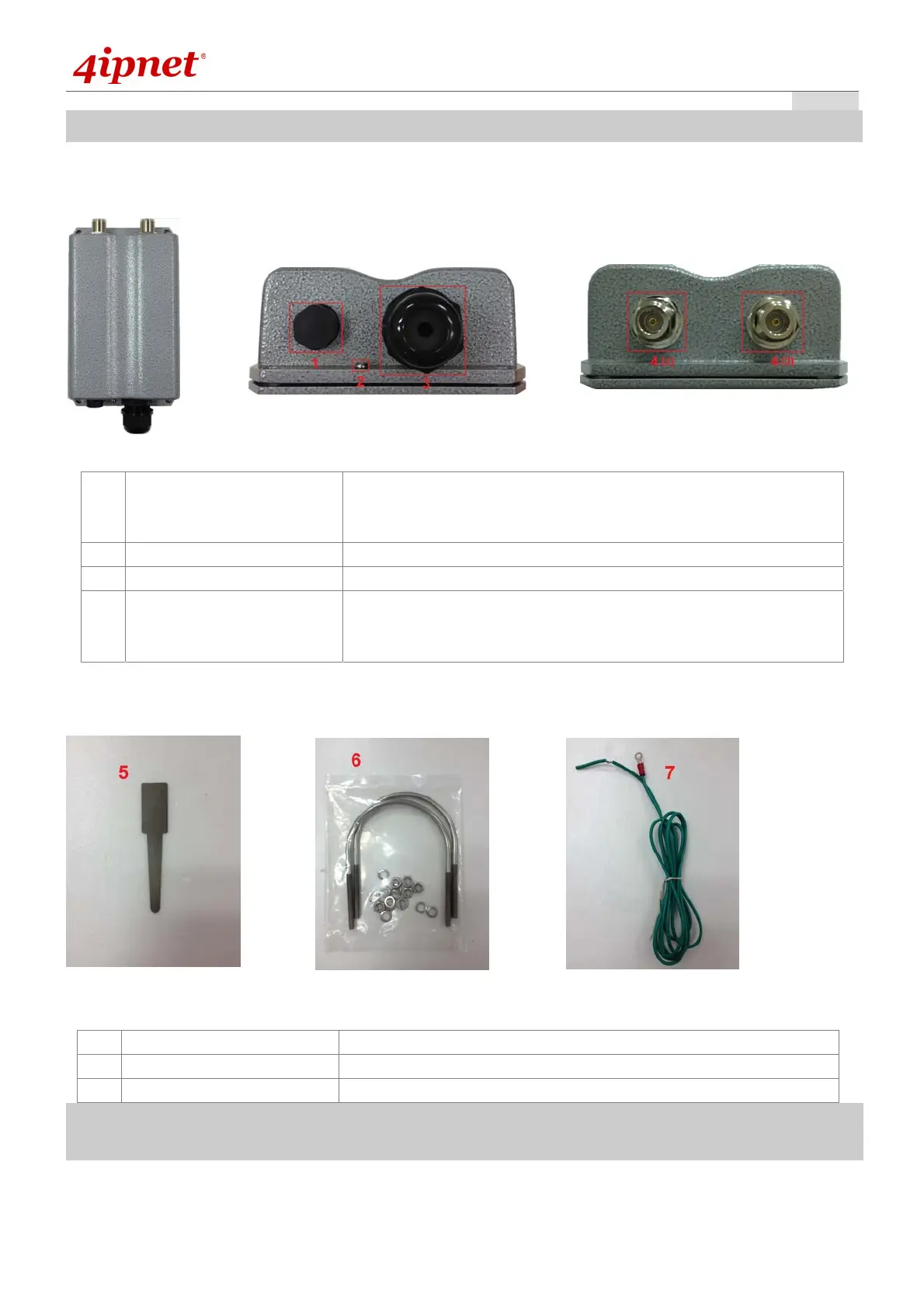
1 Ventilation Valve Due to extreme weather conditions, water vapor in the OWL530
may condense. The valve allows ventilation to prevent moisture
buildup within the OWL530.
2 Ground Connector For connecting the ground wire.
3 PoE Connector For connecting to the Power Sourcing Equipment (PSE).
4 N-type Connector x 2 For connecting to an antenna
4 (1) is the primary antenna connector and 4 (2) is the secondary.
Utilize both connectors for 802.11n MIMO optimized performance.
Parts
ardware overview
of OWL530
OWL530
5 Detachment Tool For detaching the RJ45 connector from the PoE Port
6 Pole Mount Kit Includes two U-shaped bolts, 8 hex nuts and 8 split washers
7 Ground Wire For ground connection as mentioned in 2



 To Next Page