Installation
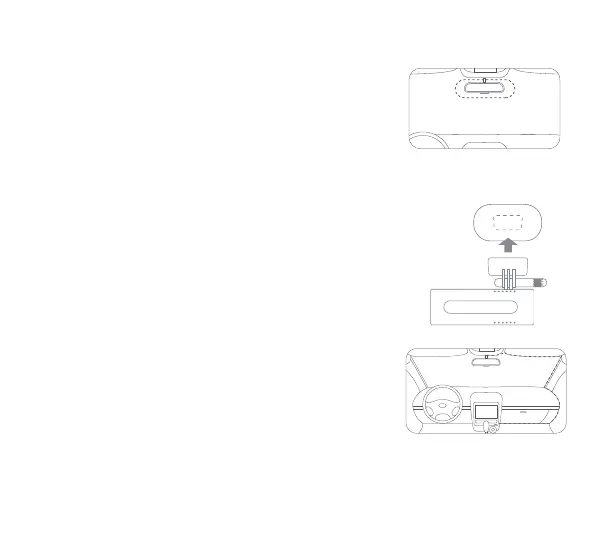
Clean your windshield and put the electrostatic sticker on the
recommended area as shown in the right figure.
Make sure you remove air bubbles between the sticker and the
glass.
1. Install the electrostatic sticker
Remove the protective cover from the mount and stick the
mount's base to the center of the electrostatic sticker. Make sure
your dash cam body is parallel to the ground.
Press the mount to attach it to the electrostatic sticker tightly.
2. Stick the camera mount to the windshield
3. Connect USB cable to the cigarette lighter receptacle
Align the cable with the top edge of the windshield and fasten it
along the passenger's side and the glovebox as shown right.
Connect the cable to the power adapter and insert the adapter
into the cigarette lighter receptacle.
Note: The cigarette lighter receptacle might be positioned differently in your
car. The picture is provided for reference only.
2


 To Next Page