paired.
USB connection: connect your SB it Do controller to your Android device via USB Cable after
step 1.
Windows (X – input)
1. press & hold X & start to turn on the controller then press pair button for 3 seconds to enter its
pairing mode. LED starts to rotate from left to right.
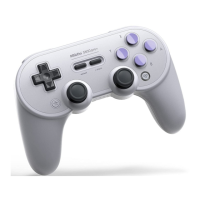
2. go to your Windows device’s Bluetooth setting, pair with [BBitDo SN30 Pro+]. LED will become
solid when connection is successful.
3. controller will auto reconnect to your Windows device with the press of start once it has been
paired.
USB Connection: connect your 8BitDo controller to your Windows device via USB Cable after
step 1.
macOS
1. press & hold A & start to turn on the controller then press pair button for 3 seconds to enter its
pairing mode. LED starts to rotate from left to right.
2. go to your macOS device’s Bluetooth setting, pair with [Wireless Controller]. LED becomes solid
when connection is successful.
3. controller will auto reconnect to your macOS device with the press of start once it has been
paired.
USB connection: connect the controller to your macOS device via USB cable after step 1.
Turbo function
1. hold the button you would like to set turbo functionality to and then press the star button to
activate/deactivate its turbo functionality.
d-pad and analogue sticks are not included.
this does not apply to Switch mode.
Battery
status →→→→→→→→→→→→→ LED indicator
low battery mode →→→→→→→→ Red LED blinks
battery charging →→→→→→→ Red LED stays solid
battery fully charged→→→→→→→→LED turns off
two double A batteries with 20 hours of play time.
20 hours of play time with a rechargeable battery pack.
rechargeable with 4 hour charging time.
Power Saving
1 minute with no Bluetooth connection, will power off.
15 minutes with Bluetooth connection but no use, will power off.
Support
Please visit support.8bitdo.com for further information & additional support.
SN30 Pro Bluetooth Gamepad User Manual – Optimized PDF
SN30 Pro Bluetooth Gamepad User Manual – Original PDF
Related Manuals:
1. 8Bitdo SN30 Pro / SF30 Pro User Manual SN30 Pro and SF30 Pro Instruction Manual 1-Press START to...



 To Next Page