33
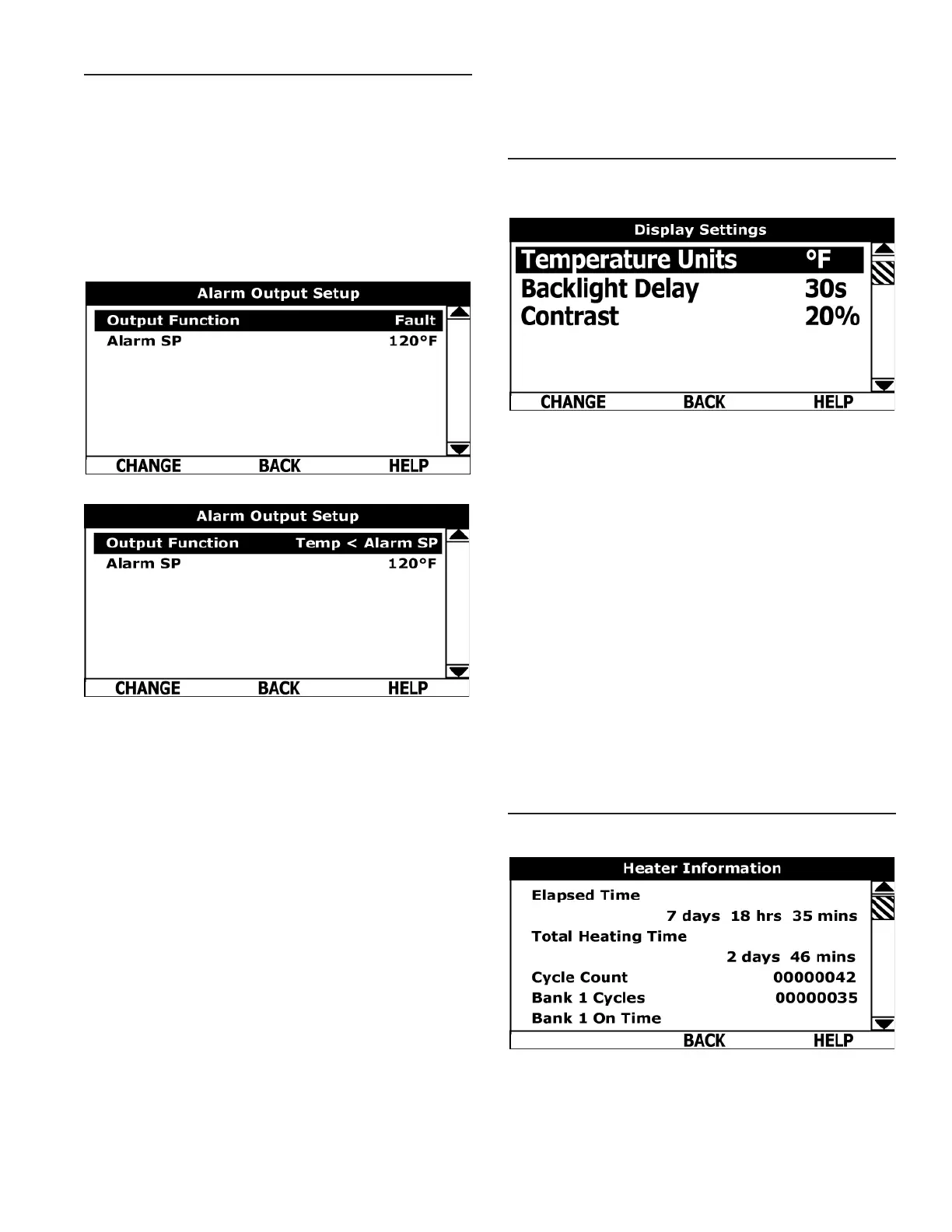
ALARM OUTPUT SETUP MENU
Permits user to set the condition (from a list of options) for
when the CCB (Central Control Board) ’s integral alarm output
relay will be energized. Alarm relay connections (common,
normally open, normally closed) are located on the J3 terminal
strip on the CCB. Alarm output relay contacts are capable of
switching 1 amp maximum at 120 VAC.
The alarm relay operates in the background according to
the settings in this menu and is not capable of disabling
water heater operation. The alarm relay is used for external
notication/verication of various operational conditions such
as fault conditions and heating mode status. This relay can
be used with building EMS (Energy Management System)
and other external supervisory controls.
Output Function
Adjustable user setting. Available options for the Alarm Output
Function setting are:
Heating Mode: Used for heating mode on/off status
notication.
Enable / Disable Closed: Used for notification and/or
verication of the enable/disable circuits open/closed status.
There are two enable/disable circuits available for external
supervisory control(s) at the J7 socket on the CCB - see wiring
diagrams. Enable/disable circuit(s) status can be viewed in
the Heater Status Menu.
Temp < Heater SP: Used for external notication when
current tank temperature drops below Operating Set Point.
Temp < Alarm SP: Used for external notication when current
tank temperature drops below programmable Alarm SP.
Fault or Alert: Used for external notication whenever a Fault
or Alert condition is active.
Fault: Used for notication whenever a Fault condition is
active.
Disabled: Disables the Alarm Relay Output Function.
Alarm SP: Adjustable user setting (90°F to 190°F) the control
system uses for the “Temp < Alarm SP” function described
above. This setting has no effect with any other Alarm Output
functions.
Alarm Output Settings: Changing the user settings in this
menu is done using the same methods for changing the
Operating Set Point.
Service Note: Adjustable user settings in the Alarm Output
Setup menu are unaffected by Restore Factory Defaults.
DISPLAY SETTINGS MENU
Permits user to set display options for viewing information on
the UIM’s LCD screen.
Temperature Units
Adjustable user setting that changes temperature units
display to Celsius °C or Fahrenheit °F.
Backlight Delay
Adjustable user setting that determines how long the UIM’s
LCD backlight remains illuminated after a key has been
pressed. Available settings are; Always Off, 10, 30 or 60
seconds and Always On.
Contrast
Adjustable user setting to adjust the UIM’s LCD screen
contrast between text and background.
Display Settings
Changing the user settings in this menu is done using the
same methods for changing the Operating Set Point.
Service Note
Adjustable user settings in the Display Settings menu are
unaffected by Restore Factory Defaults.
HEATER INFORMATION MENU
This menu displays non adjustable operational information.
Figure 21. Top Of Menu
Printed on 2/8/2018 9:05 AM CT




 To Next Page