Home
A&D
Scales
GF-1003A
Page 92 (Troubleshooting)
A&D GF-1003A - Troubleshooting; Checking The Balance Performance And Environment
112 pages
Manual
Save Page as PDF
To Next Page
To Next Page
To Previous Page
To Previous Page
Loading...
90
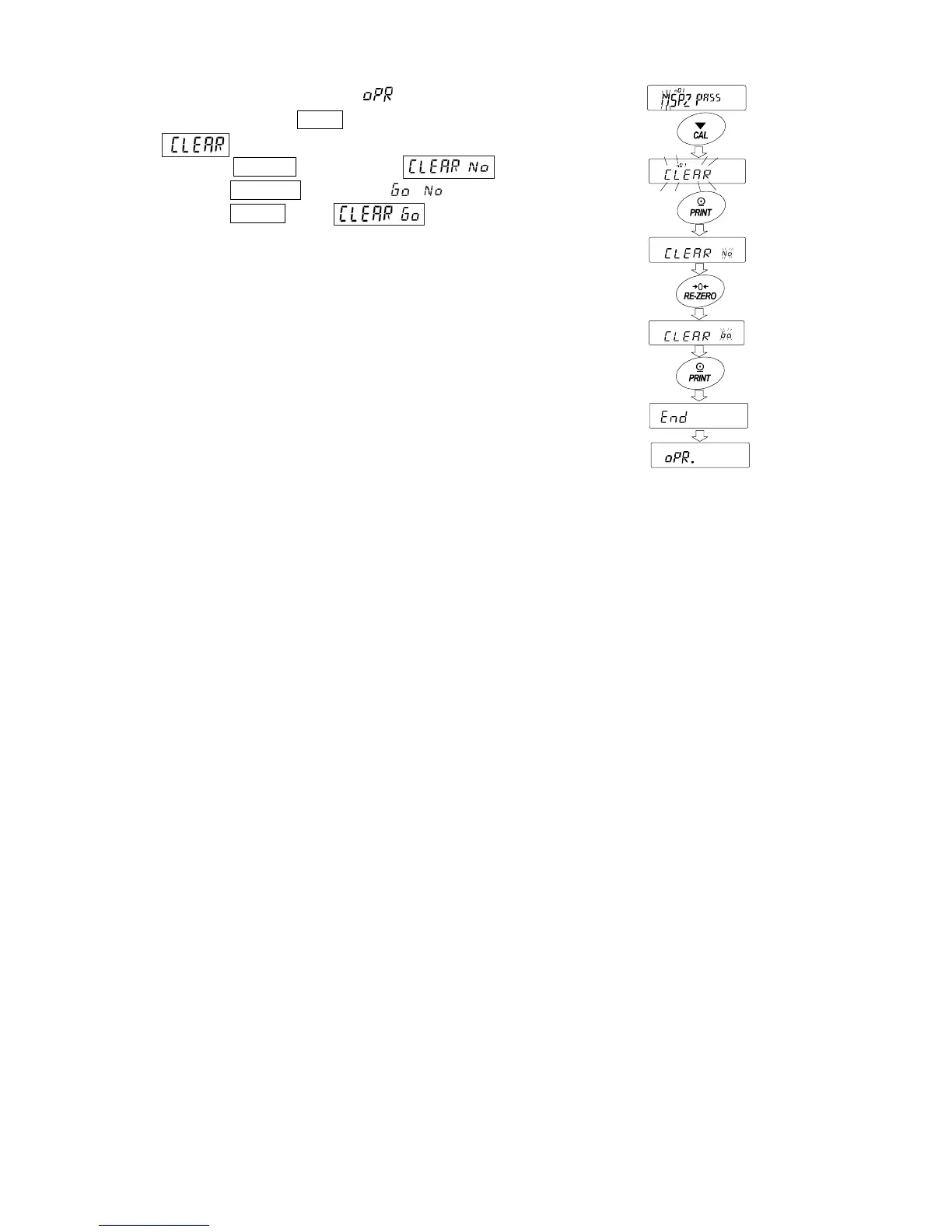
How to del
ete the
pass
word
(
.
1
~
10
)
1.
Press and ho
ld the
CAL
key to disp
lay and b
link
the
when setting the p
asswor
d.
2.
P
r
e
s
s
t
h
e
P
R
I
N
T
k
e
y
t
o
d
i
s
p
l
a
y
.
3.
Press the RE-ZERO
to change
/
.
4.
Press the PRINT
when
t
o
d
e
l
e
t
e
t
h
e
p
a
s
s
w
o
r
d
.
91
93
Table of Contents
Main Page
Default Chapter
3
Table of Contents
3
1 Introduction
6
Features
6
About the Models
7
Compliance
7
2 Unpacking the Balance
9
Installing the Balance
11
Precautions
11
During Use
12
After Use
13
Power Supply
13
3 Display Symbols and Key Operation
14
4 Weighing Units
16
Units
16
Storing Units
19
5 Weighing
21
Basic Operation
21
Counting Mode(Pcs
23
Percent Mode (%)
25
Animal Weighing Mode(Hold Function
26
6 Impact Detection Function
27
7 Response Adjustment / Self Check Function
28
Response Adjustment
28
Self-Check-Function / Automatic Setting of Minimum Weight Value
29
8 Calibration
30
Automatic Self Calibration for the GX-A Series
31
One-Touch Calibration for the GX-A Series
32
Calibration Using an External Weight
33
Calibration Test Using an External Weight
34
Correcting the Internal Mass Value of the GX-A Series
35
Correcting the Internal Mass Value of the GX-A Series (Auto)
36
Correcting the Internal Mass Value of the GX-A Series (Manual)
37
9 Function Switch and Initialization
38
Permit or Inhibit
38
Initializing the Balance
40
10 Function Table
41
Setting the Function Table
41
Setting Example
42
Details of the Function Table
43
Description of the Class "Environment, Display
50
Clock and Calendar Function
52
Comparator Function
54
11 ID Number and GLP Report
57
Setting the ID Number
57
GLP Report
59
12 Data Memory
62
Data Memory for Weighing Data
62
Data Memory for Calibration and Calibration Test
64
13 Statistical Calculation Mode
67
How to Use the Statistic Calculation
67
Statistical Calculation Mode (Example of Use)
72
14 Flow Measurement
74
How to Use Flow Measurement
75
Flow Measurement Setting
77
15 Gross Net Tare Function
79
Preparation of Gross Net Tare Function
79
Example of Using the Gross Net Tare Function
80
16 Minimum Weighing Warning Function
81
17 Underhook
83
18 Programmable-Unit
84
19 Density Measurement
85
Function Setting
86
20 Password Lock Function
90
Using Password Function
90
Changing Password
91
Inputting Password When Turning on the Balance
93
Missing Password
93
22 Troubleshooting
94
Checking the Balance Performance and Environment
94
Error Codes
96
Other Display
99
Asking for Repair
99
21 Maintenance
94
Treatment of the Balance
94
23 Specififations
100
GX-A Series 0.001G Models
100
GX-A Series 0.01G Models
101
GX-A Series 0.1G Models
102
GF-A Series 0.001G Models
103
GF-A Series 0.01G Models
104
GF-A Series 0.1G Models
105
24 External Dimention
106
Options and Perpheral Instruments
108
Other manuals for A&D GF-1003A
Communications Manual
41 pages
Maintenance Manual
52 pages
Related product manuals
A&D GF-1200
82 pages
A&D GF-300
82 pages
A&D GF-30K
104 pages
A&D GF-3000
82 pages
A&D GF-4000
82 pages
A&D GF-403A
112 pages
A&D GF-303A
112 pages
A&D GF-6002A
112 pages
A&D GF-3002A
112 pages
A&D GF-2002A
112 pages
A&D GX-400
92 pages
A&D GX-4000
92 pages



 To Next Page