29
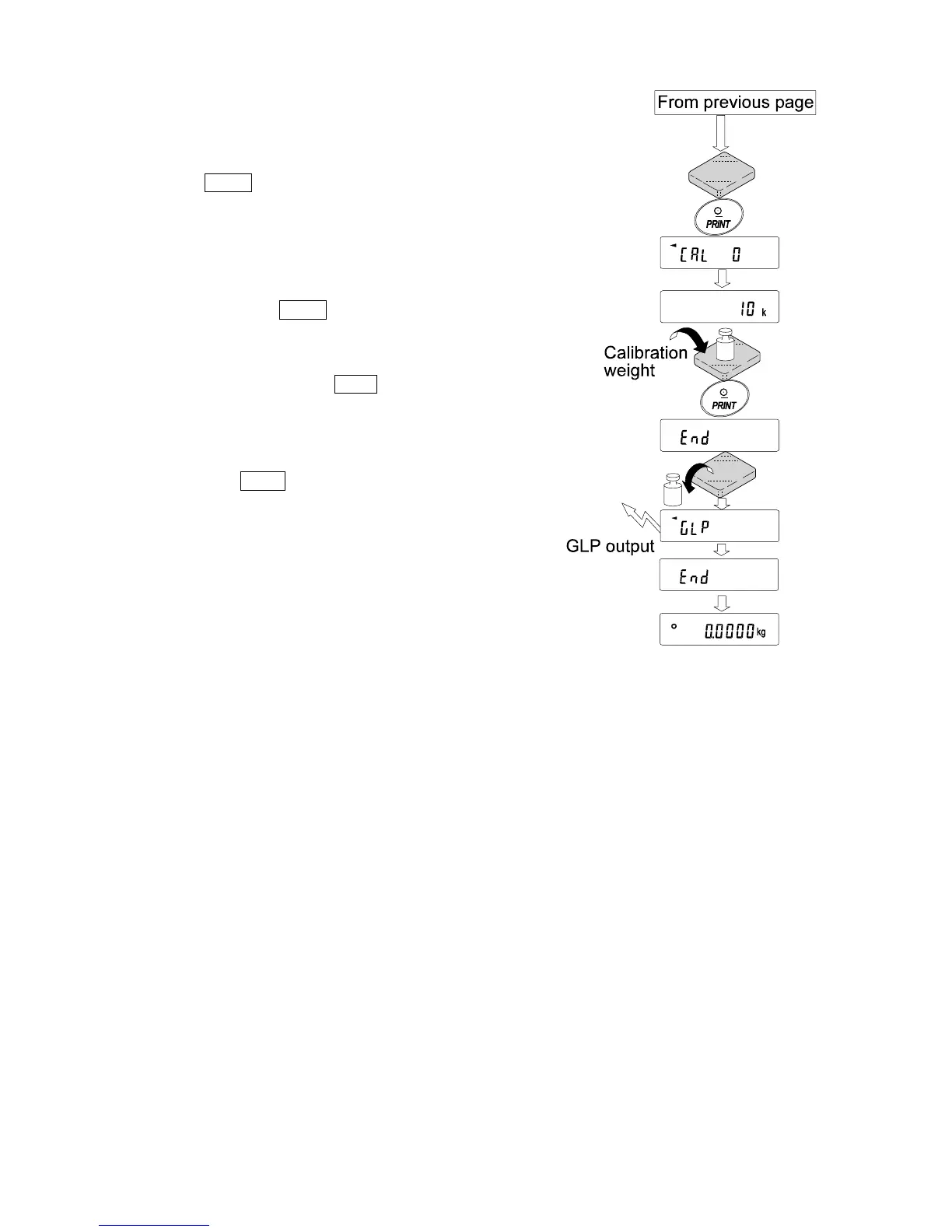
5 Confirm that there is nothing on the pan and press
the PRINT key. The balance measures the zero
point. Do not allow vibration or drafts to affect the
balance.
The balance displays the calibration weight value.
6 Place the displayed calibration weight on the pan
and press the PRINT key. The balance measures
the calibration weight. Do not allow vibration or
drafts to affect the balance.
7 The balance displays end . Remove the weight
from the pan.
8 If the “GLP output (info)” parameter, of the
function table, is set to “1” or “2”, the balance
displays glp and outputs “Calibration Report”
using the RS-232C interface or stores the data in
memory. For details on the calibration report format,
refer to “10-2 GLP Report”.
9 The balance will automatically return to the
weighing mode.
10 Place the calibration weight on the pan and confirm
that the value displayed is within ±2 digits of the
specified value. If it is not within the range, check
the ambient conditions such as breeze and
vibration, also check the weighing pan. Then,
repeat steps 1 to 10.



 To Next Page