77
14. I/O UNIT SPECIFICATIONS (Standard)
14-1 RS-232C//External Contact Input
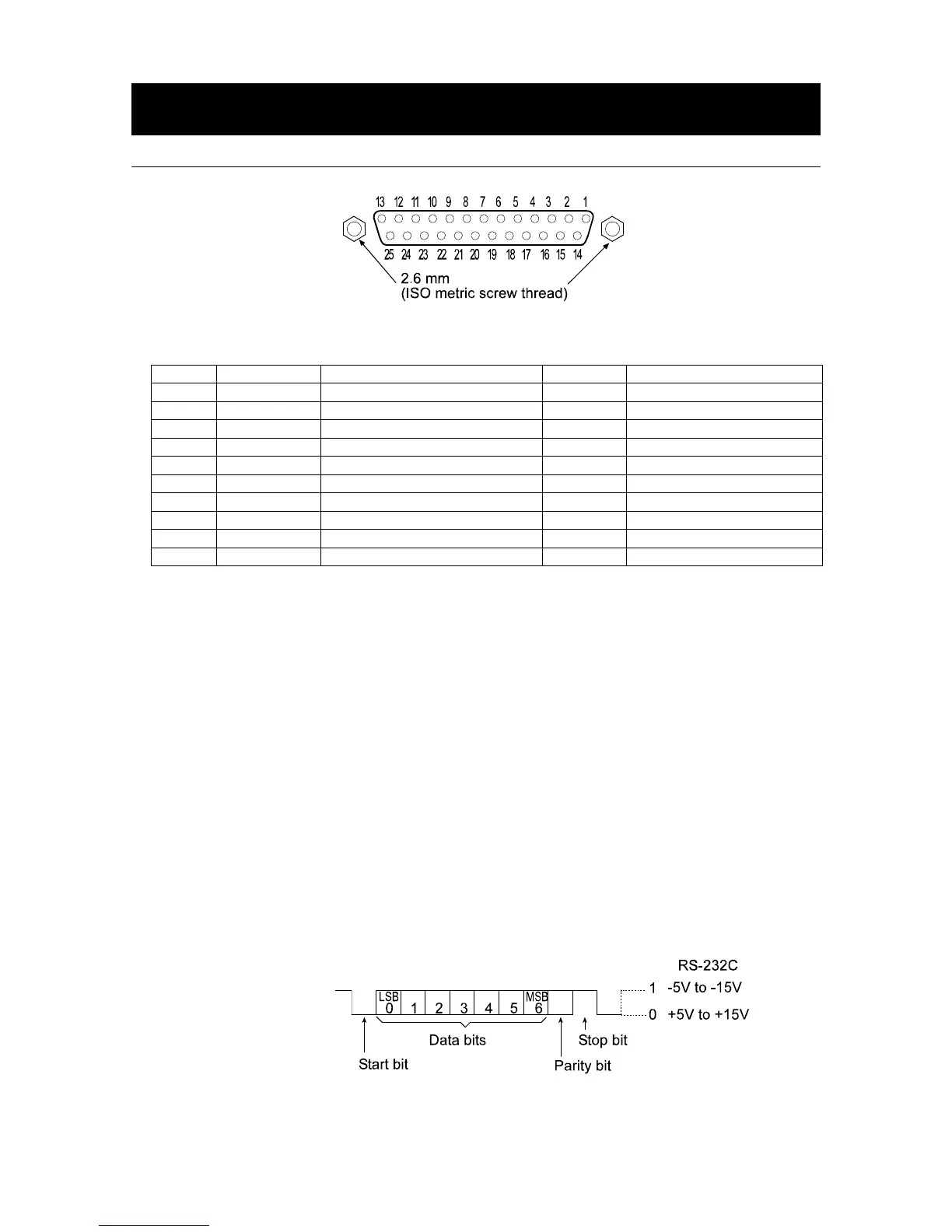
D-Sub 25 pin numbers
D-Sub 25 pin assignments
Pin No. Signal name Interface type Direction Description
1 FG - Frame ground
2 RXD RS-232C Input Receive data
3 TXD RS-232C Output Transmit data
4 RTS RS-232C Input Ready to send
5 CTS RS-232C Output Clear to send
6 DSR RS-232C Output Data set ready
7 SG RS-232C/external contact input - Signal ground
18 PRINT External contact input Input Same as the PRINT key
19 RE-ZERO External contact input Input Same as the RE-ZERO key
Others - - - No connection
RS-232C
The balance is a DCE device. Connect the balance to a personal computer (DTE), using a straight
through cable.
Transmission system : EIA RS-232C
Transmission form : Asynchronous, bi-directional, half duplex
Transmission rate : 10 times/second or 5 times/second (same as data refresh rate)
Data format : Baud rate : 600, 1200, 2400, 4800, 9600, 19200bps
Data bits : 7 or 8 bits
Parity : Even, Odd (Data bits 7 bits)
None (Data bits 8 bits)
Stop bit : 1 bit
(When sending, 2 bits; receiving, 1 bit.
A personal computer will function with either
setting.)
Code : ASCII



 To Next Page