Home
AAXA Technologies
Projector
P400
Page 33 (Option Settings)
AAXA Technologies P400 - Option Settings
40 pages
Manual
Save Page as PDF
To Next Page
To Next Page
To Previous Page
To Previous Page
Loading...
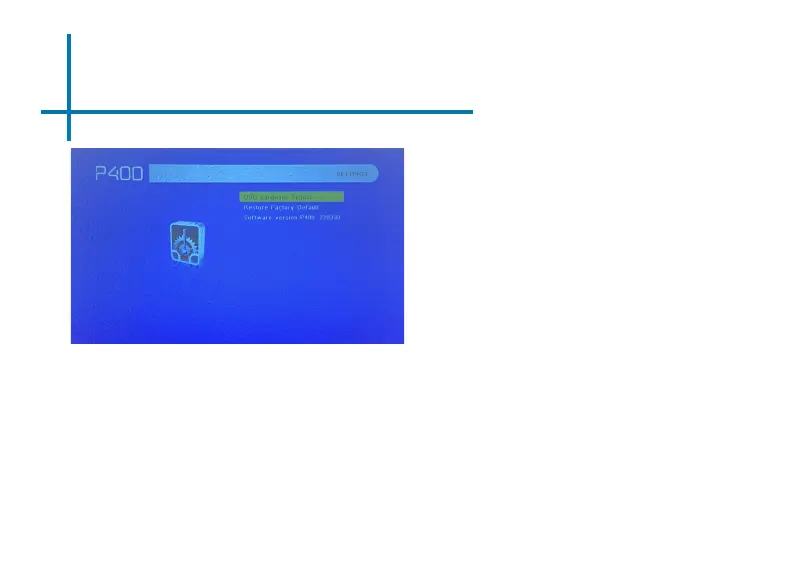
Option Settings
30
OSD Language
•
Changes the language of the
device. Options include English,
Spanish, Chinese, German,
French
Restore Factory Default
•
Restores the projector to factory
settings
Software V
ersion
•
Current software version in use
32
34
Table of Contents
Main Page
default chapter
3
Table of Contents
3
Chapter 1: P400 at a Glance
4
Keypad
4
Accessories
6
Chapter 2: Getting Started
7
Focus Adjustment / Throw Distance
8
Headphones
9
Loading External Content
10
Chapter 3: Menu Screens
13
Main Menu
13
Brightness Menu
14
Video Player Menu
15
Photo Menu
19
Connecting to Device Via
23
Music Player Menu
26
Ebook Viewer
29
Chapter 4: Settings Menu
30
Picture Settings
31
Sound Settings
32
Option Settings
33
Chapter 5: Technical Details
34
Troubleshooting
34
Specifications
38
Notes
39
Related product manuals
AAXA Technologies P400+
52 pages
AAXA Technologies P450
46 pages
AAXA Technologies P2
21 pages
AAXA Technologies P7
44 pages
AAXA Technologies P5
50 pages
AAXA Technologies P300
44 pages
AAXA Technologies P2 Jr.
2 pages
AAXA Technologies LED PICO
39 pages
AAXA Technologies P300 Neo
57 pages
AAXA Technologies P2jr Pico
38 pages
AAXA Technologies LED PICO +
46 pages
HP3 Halloween Projector
30 pages














 To Next Page