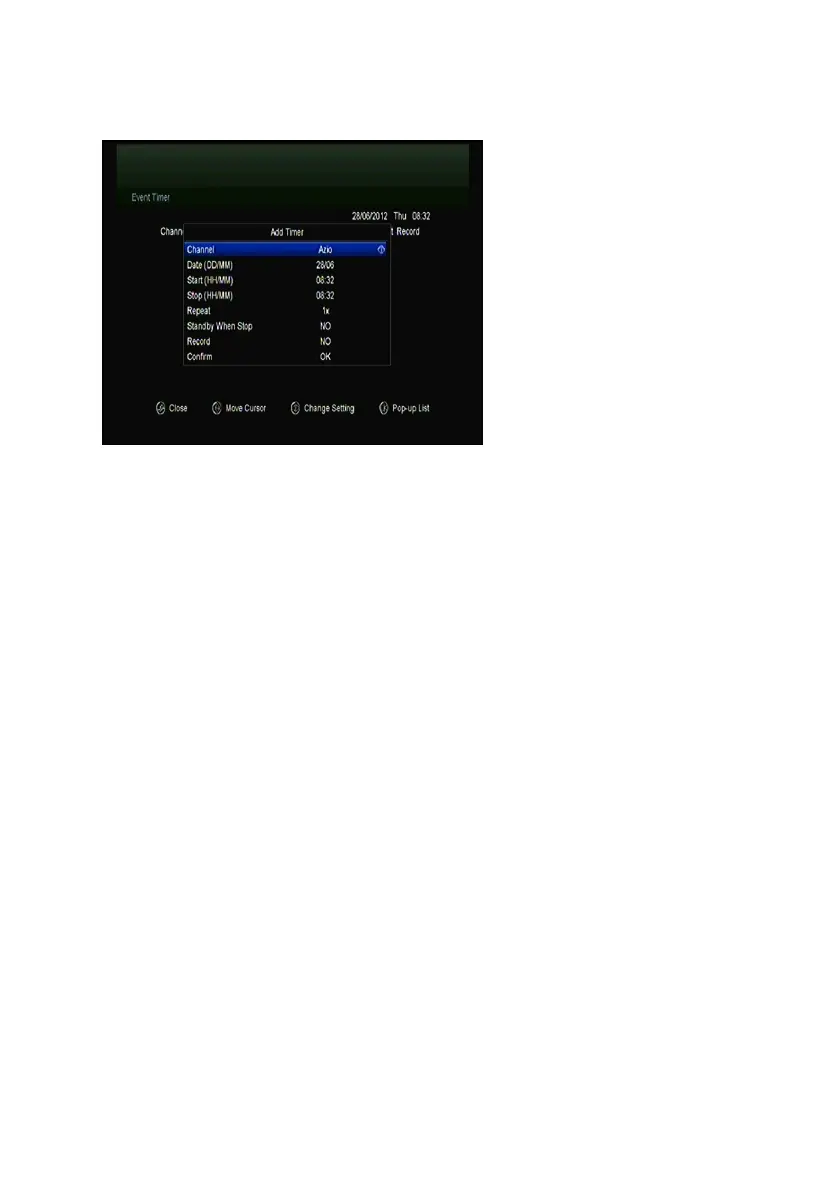
automatically according to the timer event list that you set.
1. Menu-> Settings ->TIMES-> Event Timer or press the TIMER button
directly.
2. Press the Green button to setup a timer, and press the OK button to save
the timer after setup.
Channel
Select the Channel from Channel List.
Date
Input start date of the timer.
Start/Stop
Set Start and Stop time of the timer.
Repeat
l <1X> only one time.
l <Day> Repeat every day.
l <Weekly> Repeat the channel weekly.
l <1-5> Repeat the channel from Monday to Friday.
l <6-7> Repeat the channel from Saturday to Sunday.
Standby when Stop
If set YES, the receiver will go to standby mode after the timer, if set NO it won’t
be standby.
Time Record


 To Next Page