If set YES, only if there is a USB device, it will be recorded automatically when
the timer is started. And the recorded PVR will be saved in USB device. If set
NO, it will not be recorded.
3. In Event Timer menu, highlight one event, press the Red button will cancel
this timer and press the Yellow button can go to edit this timer.
5.4.3 Sleep Timer
SLEEP Timer can set the automatic turn off time.
1. Menu-> Settings
->TIMES-> Sleep Timer.
2. Press the ◄ /► button to
select the option or input the
number at “-- M” option.
3. Press the OK button to save.
5.4.4 APD Settings
APD Setting can set the power
turn down automatically.
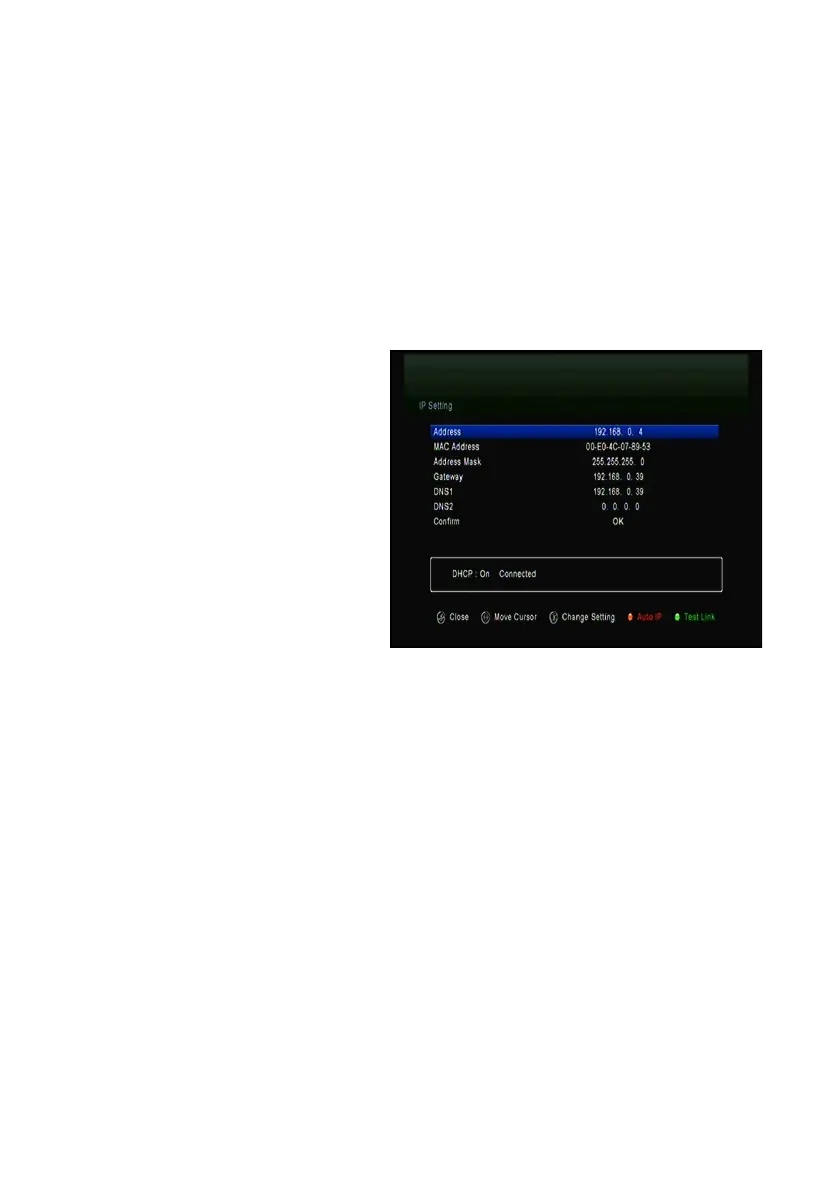
5.5.IP Setting
1. Connect one end of the Ethernet cable to the product and the other end to the
LAN router.
2. Menu-> Settings ->IP Setting
If the Ethernet cable is connected fine, it will display “Connect”. In this menu,
you can set IP address manually, and also you can get IP address
automatically.
Ø Red: Get IP address automatically.
Ø Green: Test the network if connect correctly.
5.6 3G
Plug in the 3G dongle with 3G card inside to the USB port.
In this menu,you can see the 3G module type,Access point,set Auto
Connect.When recognize the 3G dongle,it will display"Ready",when the internet


 To Next Page