9
EN
Behaviour of output load with programs from P01 to P06, according to the priorities.
2-3 Create a new program
Procedure valid for all types of programs Further settings are described in the
individual programs.
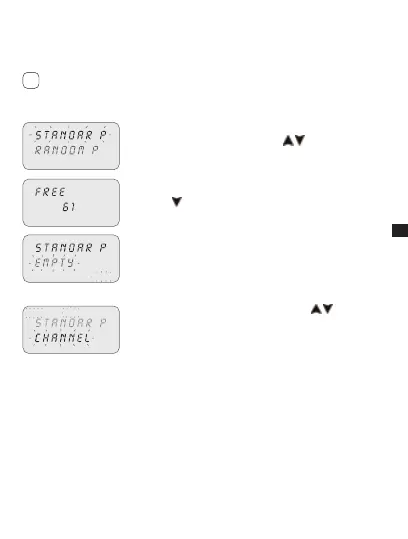
Selection of program type (e.g. with P Standard):
Press1. MENU.
Select program type using keys 2.
.
Press3. OK to confirm selection.
The number of free programs appears for 3 secs.»
The first program in the memory appears.»
Press4.
for 2 secs.
The display shows the first empty program.»
Press5. OK to confirm.
The program number is selected.»
Followed by channel setting.»
Select channel (only twin channel models)
c1 c2
P02
Set channel (twin channel) using keys 1. .
C1/C2 or both flash.»
Press2. OK to confirm.
The channel is set.»
Followed by day setting.»
i
P02



 To Next Page