EasyManua.ls Logo

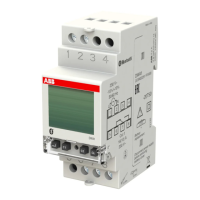
ABB DWA1 - User Manual

ABB DWA1
59 pages
Print Icon
To Next Page IconTo Next Page
Loading...
DIGITAL WEEKLY TIME/ASTRONOMICAL
SWITCH
User Manual
DWA
Question and Answer IconNeed help?

Do you have a question about the ABB DWA1 and is the answer not in the manual?

Summary

Technical Specifications

Safety Instructions

Device Dimensions

Wiring Connections

Display and Controls

Initial Setup and Configuration

Main Display Screen

Manual Operation

Menu Overview

Settings Menu Overview

Overview of configurable device settings.

Program Management Menu

Access to create, check, modify, copy, and delete programs.

Bluetooth Interface Settings

Configuration options for the Bluetooth interface.

Hour Counter Details

View relay usage hours.

Reset Options

Options for resetting device settings and programs.

Firmware Version Display

Display of the installed firmware version.

Device Settings

Language Configuration

Change the device's display language.

Date Configuration

Set the current date on the device.

Time Configuration

Set the current time on the device.

DST Configuration

Configure automatic DST adjustments.

Astronomical Location Setup

Set geographical location for astronomical functions.

Random Switching Intervals

Define time intervals for random switching.

Cycle Switching Durations

Set ON/OFF durations for cyclical switching.

PIN Protection Setup

Set or disable keyboard protection with a PIN.

Program Management

Creating New Programs

Guide to creating a new switching program.

Viewing Existing Programs

Review existing programmed events.

Editing and Deleting Programs

Options to modify or remove existing programs.

Program Copying (DWA2)

Copy programs between channels on DWA2.

Deleting All Programs

Erase all programs for a selected channel.

Bluetooth Connectivity

Activating Bluetooth

Steps to activate the Bluetooth functionality.

Deactivating Bluetooth

Steps to deactivate the Bluetooth functionality.

Bluetooth Password Management

How to set or change the Bluetooth association password.

Usage Hour Counter

Reset Hour Counter

Procedure to reset the usage hour counter.

Device Reset Options

Resetting Device Settings

Resets device settings, excluding language and PIN.

Resetting Time Programs

Deletes all saved time programs.

Resetting Holiday Programs

Deletes all saved holiday programs.

Resetting Astro Programs

Deletes all saved astronomical programs.

Resetting Usage Counters

Resets usage counters for all channels.

Full System Reset

Performs all resets and removes language/PIN protection.

Performing a Hardware Reset

Resets device to factory state without losing settings.
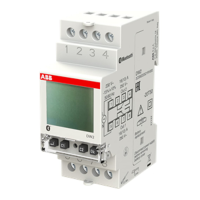
Firmware Information

Troubleshooting Error Codes

Battery Replacement

Compliance and Standards

Summary

Technical Specifications

Safety Instructions

Device Dimensions

Wiring Connections

Display and Controls

Initial Setup and Configuration

Main Display Screen

Manual Operation

Menu Overview

Settings Menu Overview

Overview of configurable device settings.

Program Management Menu

Access to create, check, modify, copy, and delete programs.

Bluetooth Interface Settings

Configuration options for the Bluetooth interface.

Hour Counter Details

View relay usage hours.

Reset Options

Options for resetting device settings and programs.

Firmware Version Display

Display of the installed firmware version.

Device Settings

Language Configuration

Change the device's display language.

Date Configuration

Set the current date on the device.

Time Configuration

Set the current time on the device.

DST Configuration

Configure automatic DST adjustments.

Astronomical Location Setup

Set geographical location for astronomical functions.

Random Switching Intervals

Define time intervals for random switching.

Cycle Switching Durations

Set ON/OFF durations for cyclical switching.

PIN Protection Setup

Set or disable keyboard protection with a PIN.

Program Management

Creating New Programs

Guide to creating a new switching program.

Viewing Existing Programs

Review existing programmed events.

Editing and Deleting Programs

Options to modify or remove existing programs.

Program Copying (DWA2)

Copy programs between channels on DWA2.

Deleting All Programs

Erase all programs for a selected channel.

Bluetooth Connectivity

Activating Bluetooth

Steps to activate the Bluetooth functionality.

Deactivating Bluetooth

Steps to deactivate the Bluetooth functionality.

Bluetooth Password Management

How to set or change the Bluetooth association password.

Usage Hour Counter

Reset Hour Counter

Procedure to reset the usage hour counter.

Device Reset Options

Resetting Device Settings

Resets device settings, excluding language and PIN.

Resetting Time Programs

Deletes all saved time programs.

Resetting Holiday Programs

Deletes all saved holiday programs.

Resetting Astro Programs

Deletes all saved astronomical programs.

Resetting Usage Counters

Resets usage counters for all channels.

Full System Reset

Performs all resets and removes language/PIN protection.

Performing a Hardware Reset

Resets device to factory state without losing settings.

Firmware Information

Troubleshooting Error Codes

Battery Replacement

Compliance and Standards

ABB DWA1 Specifications

General IconGeneral
BrandABB
ModelDWA1
CategoryTimer
LanguageEnglish

Related product manuals