M1M FIRMWARE UPDAT E
5 /8
3 Procedure via M1M FW update tool
After opening the FW update tool, two different procedures are needed in case
of connection via Modbus RTU or Modbus TCP/IP
3.1 Connection to M1M
3.1.1 Modbus RTU (M1M Modbus)
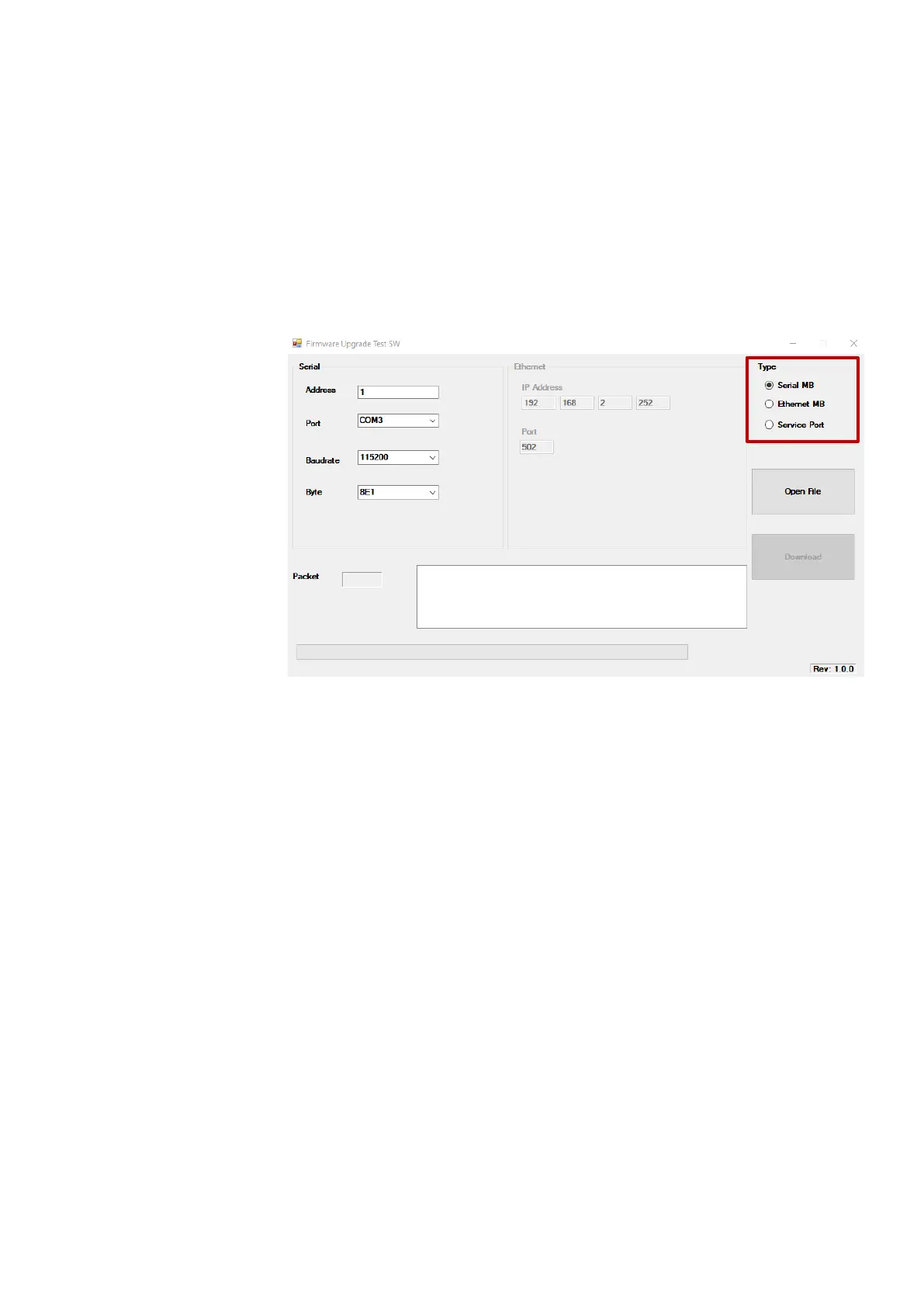
Select type: Serial MB
It is needed to enter the main communication parameters of the
device:
- Address: enter the value of the device that can be found in the
"MENU"→"CONF"→"COMM"→”ADDR” page of M1M (options:
from 1 to 247)
- Port: select the port that is being used to connect the device to
the computer (COM3 for RS-232 port, COM4 for USB port)
- Baudrate: enter the value of the device that can be found in the
"MENU"→"CONF"→"COMM"→”BAUD” page of M1M (options:
9600, 19200, 38400, 57600, 115200)
- Byte: enter the value of the device that can be found in the
"MENU"→"CONF"→"COMM" →”BYTE” page of M1M (options:
(8E1, 8O1, 8N1, 8N2)



 To Next Page