VSN800 Weather Station Product Manual
- 11 -
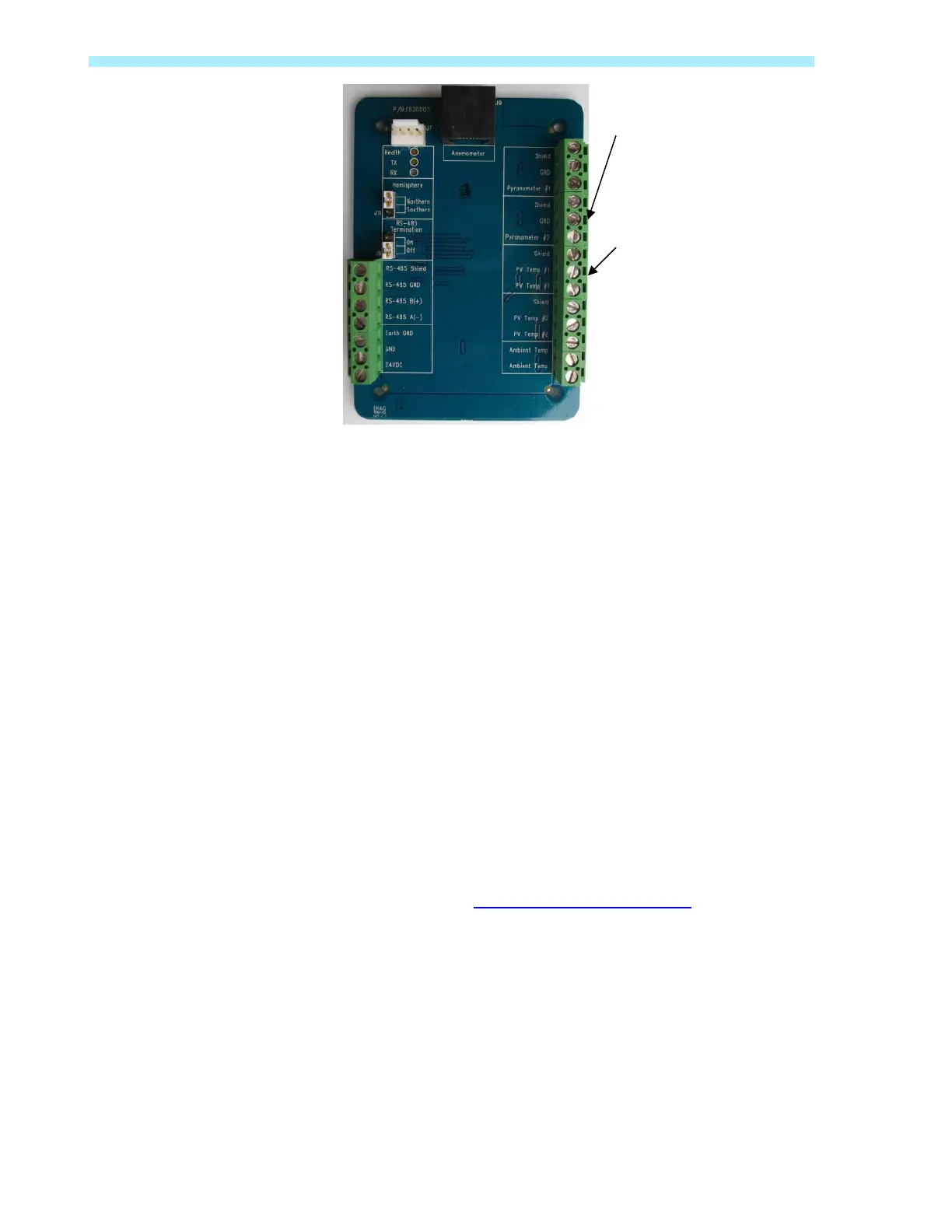
Weather Station Electronics Board, Connect Secondary Sensors (VSN800-14 Model)
The Pyranometer sensors are not interchangeable. The Pyranometer sensor supplied with the
weather stations must be wired to Pyranometer #2.
The PV temperature sensor is not polarity sensitive. Therefore, each signal wire is
interchangeable. The sensor comes with a 25ft length of cable. If the temperature sensor is not
used, it should be terminated with a 0-ohm shunt between the positive and negative signal.
Plane-of-Array Sensor Terminals
Pyranometer #2: Positive Signal (Red)
Ground: Negative Signal (Black)
Shield: Cable Shield and Drain (clear)
PV Temperature Terminal, 1
st
Sensor
PV Temp #1: Signal (Black or White)
PV Temp #1: Signal (Black or White)
Shield: Cable Shield and Drain (bare)
Connect PV panel sensor (VSN800-12 only)
If you are not planning to connect the PV panel temperature sensor, skip this section.
1. Attach the PV panel temperature sensor so it registers the temperature on the
backside of a PV panel. See Sensor Mounting Requirements
for location and
mounting considerations.
2. Connect the sensor to the proper location on the circuit board. Note that the PV Temp
#2 connectors are not used for the VSN800-12 Model.
Connect Second Pyranometer
Temperature Sensor


 To Next Page