SECTION 6
SECTION 7
39
i-STAT
Alinity — Quick Reference Guide Art: 731848-01 Rev. M Rev. Date: 25-Jul-2022
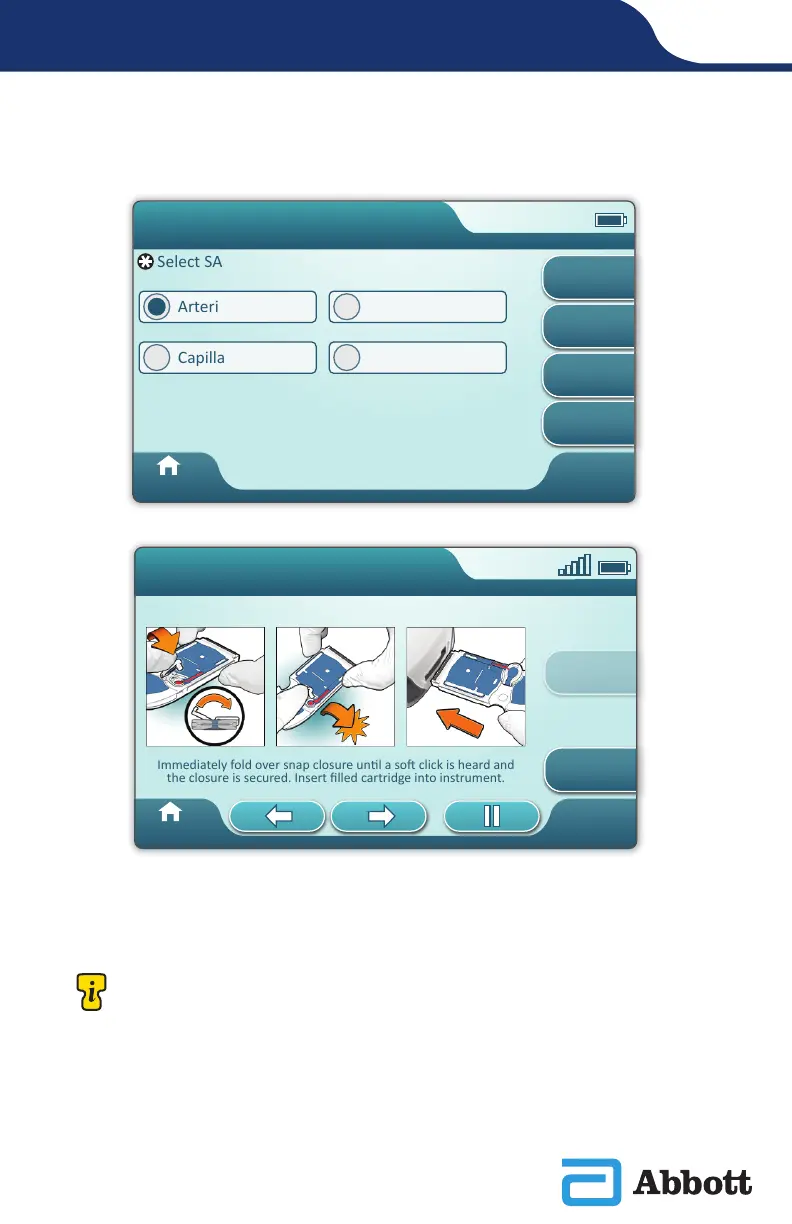
This screen will display if more than one sample type is applicable.
Below the Patient ID is the sample type selected from the previous screen or single
sample type that is appropriate for the cartridge scanned. The action buttons at the
bottom of the screen allow forward, backward and pause functionality.
Close and Insert Filled Cartridge
Prepare material per
manufacturer’s
instrucon
Immediately fold over snap closure unl a so click is heard and
the closure is secured. Insert filled cartridge into instrument.
Page 3 of 3
Home
View
Entered Info
Previous
i-STAT CHEM8+
Pt: 123456
Arterial
Select SAMPLE TYPE
Arterial
Capillary
Venous
Unspecified
Home
View
Entered Info
Next
Previous
Override
Pa�ent Test
Pt: 123456
For experienced users, the help screens may be bypassed by inserting a lled
cartridge.












 To Next Page