SECTION 8
SECTION 7
SECTION 8
47
i-STAT
Alinity — Quick Reference Guide Art: 731848-01 Rev. M Rev. Date: 25-Jul-2022
Base Station, Electronic Simulator and Printer
4
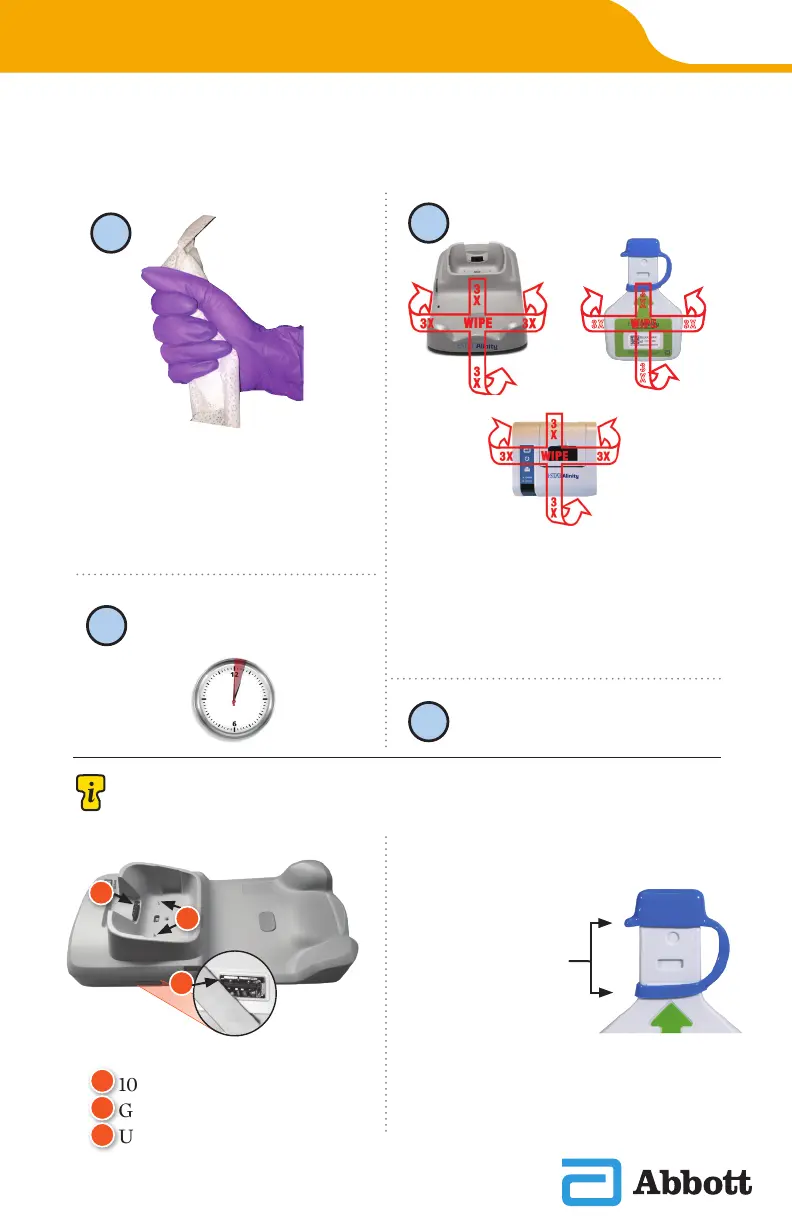
Wipe dry with gauze.
Remove a wipe from the
container and squeeze out
any excess uid before you
begin to wipe the surface.
Wipe the front as shown, ip products
on back side and repeat.
WIPE 3X
LEFT & RIGHT
1
2
WIPE 3X
UP & DOWN
SENSITIVE AREAS
Avoid forcing liquid into these areas:
D
E
F
Base Station
10-Pin Connector
Gold contact pins (2)
USB Port
D
E
F
Electronic
Simulator
Area between
protective cap
retaining ring
and white
sensor area
WIPE
3
X
3
X
3X 3X
3
Allow all surfaces to
remain wet for 3 minutes.












 To Next Page