BIOS Setup 3-13
Quick Power On Self Test:
When set to [Enabled], this item speeds up the Power On Self Test (POST) after powering on the system.
The BIOS shorten or skip some check during the POST.
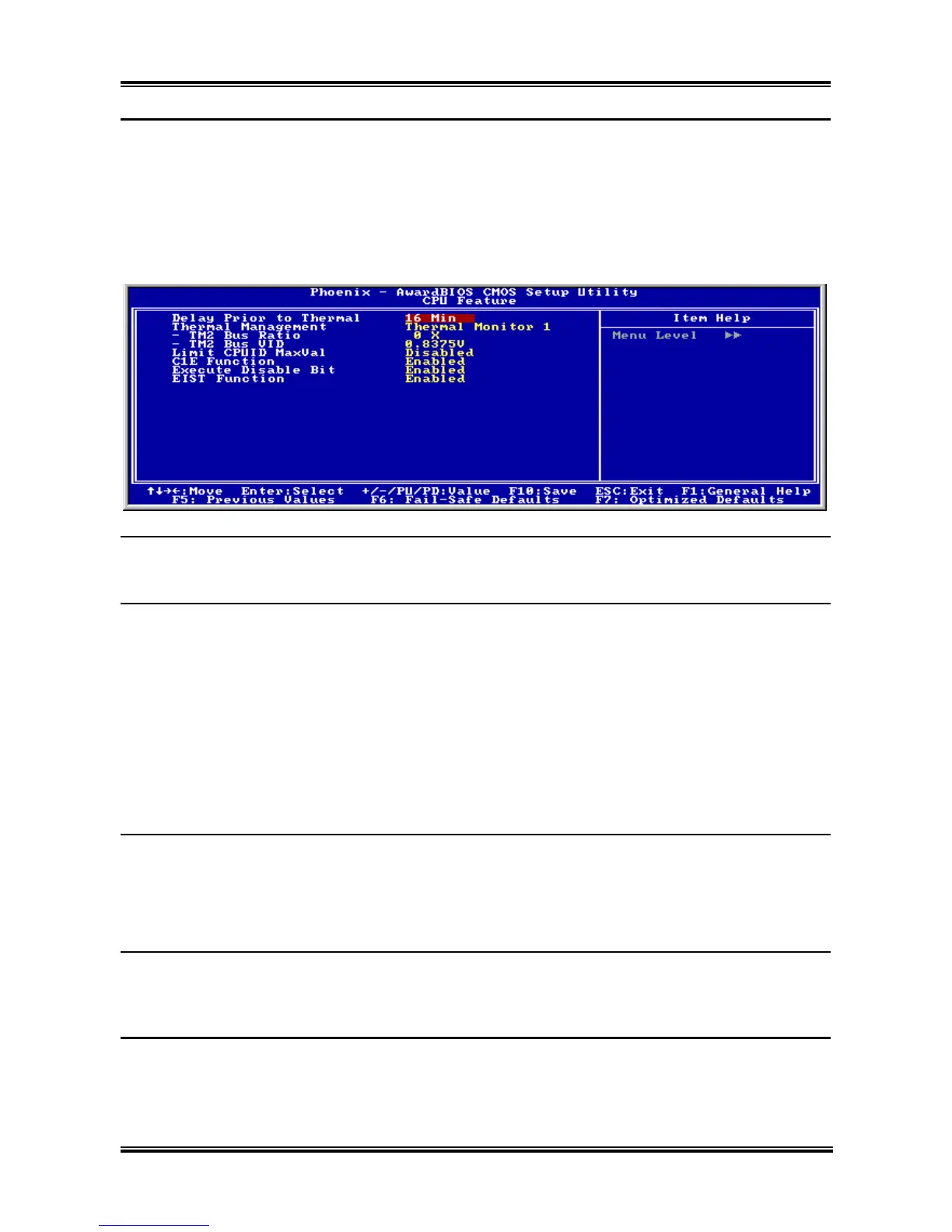
# CPU Feature:
Click <Enter> key to enter its submenu:
Delay Prior to Thermal:
This item selects the delay time before thermal activation.
Thermal Management
This item selects the type of thermal monitoring.
! TM2 Bus Ratio
This item represents the frequency (bus ratio) of the throttled performance state that will be initiated when
the on-die sensor goes from not hot to hot).
! TM2 Bus VID
This item represents the voltage of the throttled performance state that will be initiated when the on-die
sensor goes from not hot to hot.
Limit CPUID MaxVal
When set to [Enabled], this item limits the CPUID maximum value to 3, which is usually required for
older OS like Windows NT4.0.
Leave this item to its default [Disabled] settings for OS like Windows XP.
C1E Function
This item appears only for certain processors with the C1E (Enhanced Halt State) Function. When set to
[Enabled], the processor will further reduce the total power consumption.
Execute Disable Bit
This item appears only for certain processors with the Execute Disable Bit (XD bit) feature. When set to
[Enabled], this item allows the processor to prevent data pages from being used by malicious software to
execute code and provide memory protection.
User’s Manual



 To Next Page