D-6 Appendix D
BE6
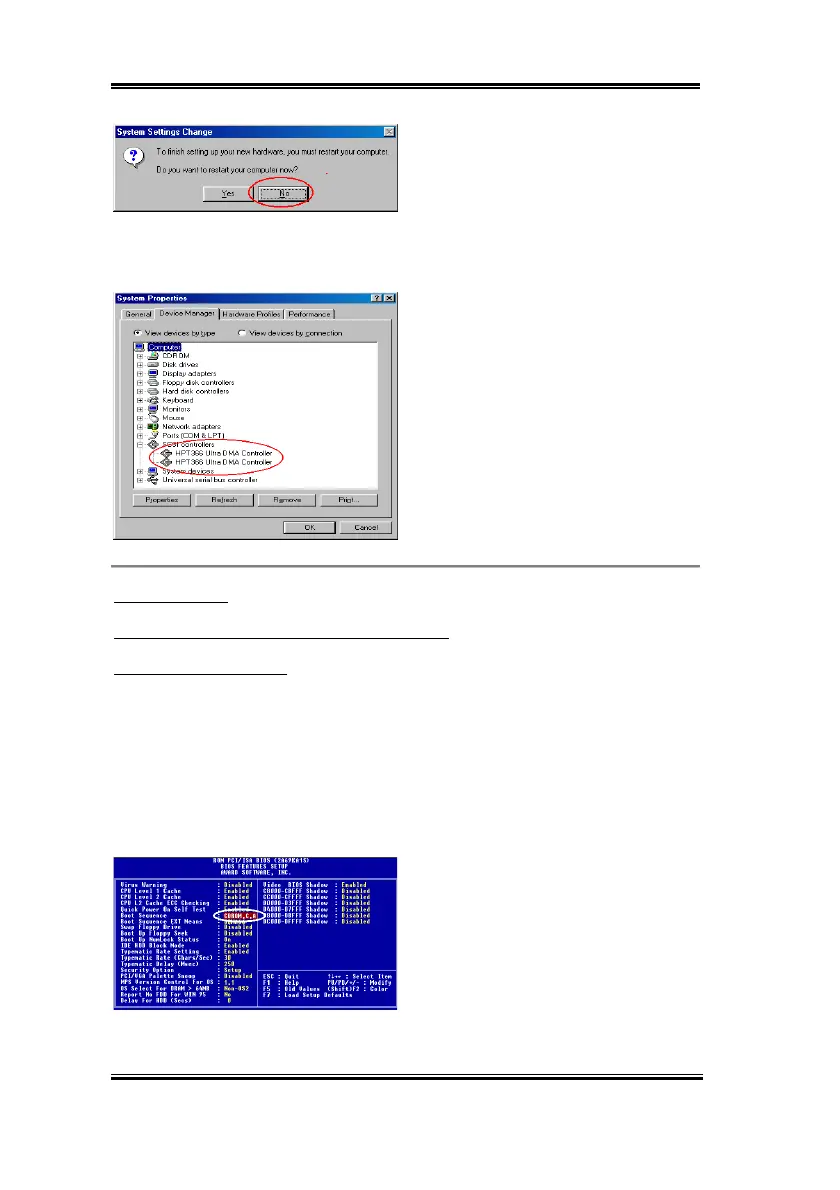
Step 9:
Click “
No
” to continue updating
another “
PCI Mass Storage Controller
”
driver. The installation procedure is the
same as Steps 3 to 10. After updating
another controller driver, the system will ask
you to restart your computer. Click “
Yes
” to
restart your computer.
Step 10:
After your system has restarted,
you can enter “
Control Panel
”
)
“
System
”,
and then select “
Device Manager
”
)
“
SCSI Controllers
”. If Ultra ATA/66 driver
is installed correctly, you will see the figure
on the left.
Windows NT 4.0
Installing drivers during Windows NT installation:
*
CD-ROM disk Install:
The following instructions explain how to install the Ultra ATA/66 driver, while installing
Windows NT 4.0.
Step 1:
When you power the computer on, you will see the following message appear
briefly at the bottom of the screen during POST:
PRESS DEL TO ENTER SETUP
Please press the
DEL
key immediately to enter the BIOS setup utility.
Step 2:
Select “
BIOS FEATURE SETUP
”
after you enter BIOS setup utility. Then set
the “
Boot Sequence
” as “
CDROM,C,A
”
(refer to figure left).
After you finished the setting, please
remember to save it.



 To Next Page