Installing the driver for Ultra ATA/66 D-7
User’s Manual
NOTE
If you have a
SCSI CDROM
, you have to set the “
Boot Sequence
" as “
EXT,C,A
" and
the "
Boot Sequence EXT Means
" as "
SCSI
" in the "
BIOS Features Setup
"
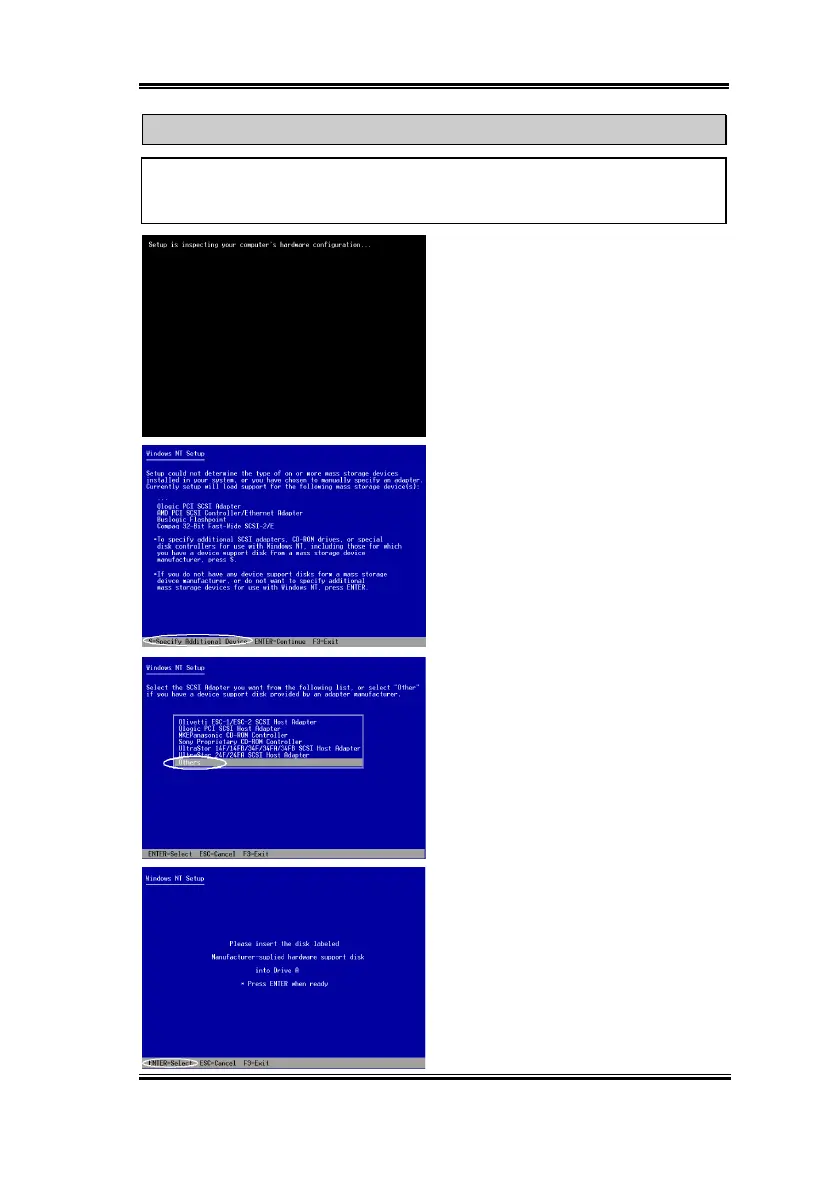
Step 3:
Insert the Windows NT installation
CD (must be bootable) into your CD-ROM.
Press the “
F6
” key immediately when the
message “
Setup is inspecting your
computer’s hardware configuration…
”
appears.
Step 4:
Press “
S
” to specify an additional
device (Ultra ATA/66 IDE controller)
Step 5:
Press “
ENTER
” to select “
Others
”
Step 6:
Insert the Ultra ATA/66 Driver
diskette into drive A, and press “
ENTER
”.



 To Next Page