D-8 Appendix D
BE6
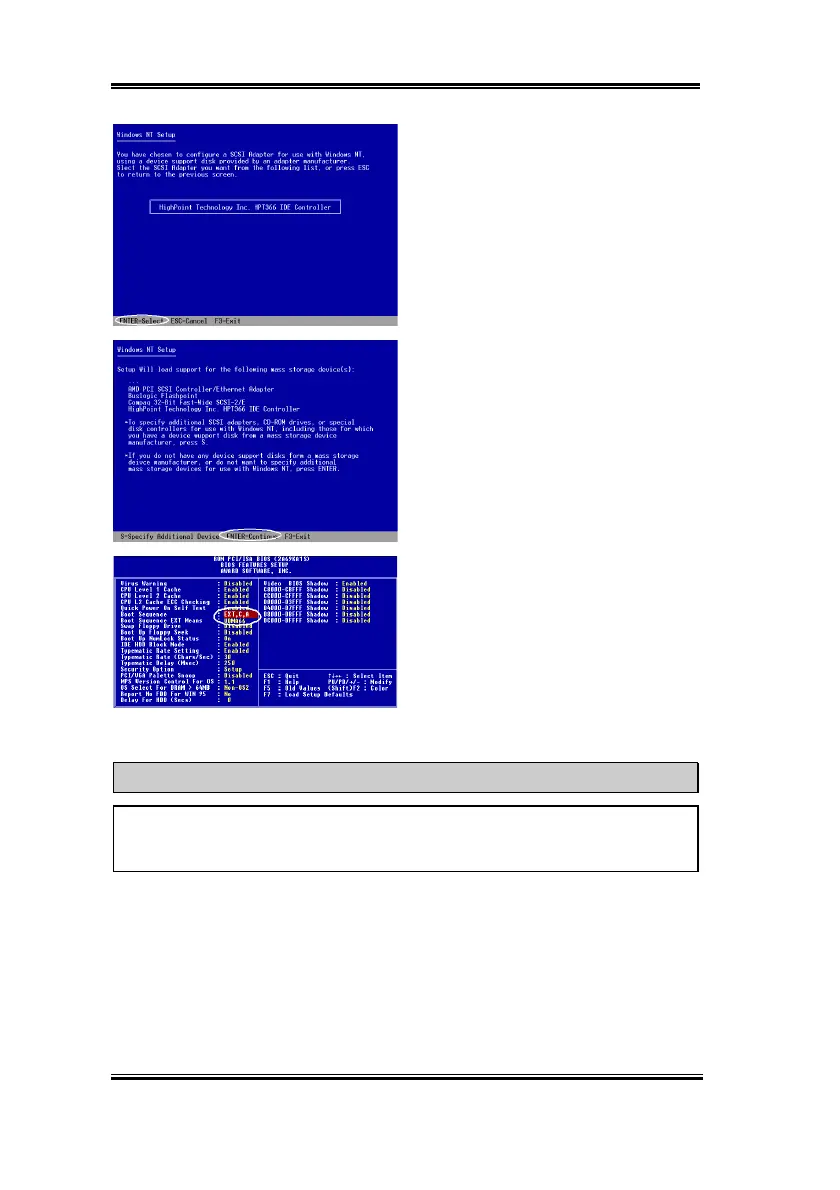
Step 7:
Press “
ENTER
” to select
“
HighPoint Technology Inc. HPT 366 IDE
controller
.”
Step 8:
Press “
ENTER
” to continue
Windows NT 4.0 installation.
If you have followed the steps described
above, you should be finished installing
your Ultra ATA/66 IDE controller. For the
rest of Windows NT installation steps,
please follow the instructions displayed in
the NT setup program.
Step 9:
After the first stage installation of
Windows NT 4.0 is finished, you will need
to restart your computer. Please enter the
BIOS setup utility again when your system
is rebooting (refer to step 1). Select “
BIOS
FEATURE SETUP
” after you enter BIOS
setup utility. Then set the “
Boot Sequence
”
as “
EXT,C,A
” and the “
Boot Sequence EXT Means
” as “
UDMA66
.”
NOTE
Don’t remove your Windows NT installation CD after the first reboot because Windows
NT setup is not finished yet and still needs to copy files from the CD-ROM.



 To Next Page