D-10 Appendix D
BE6
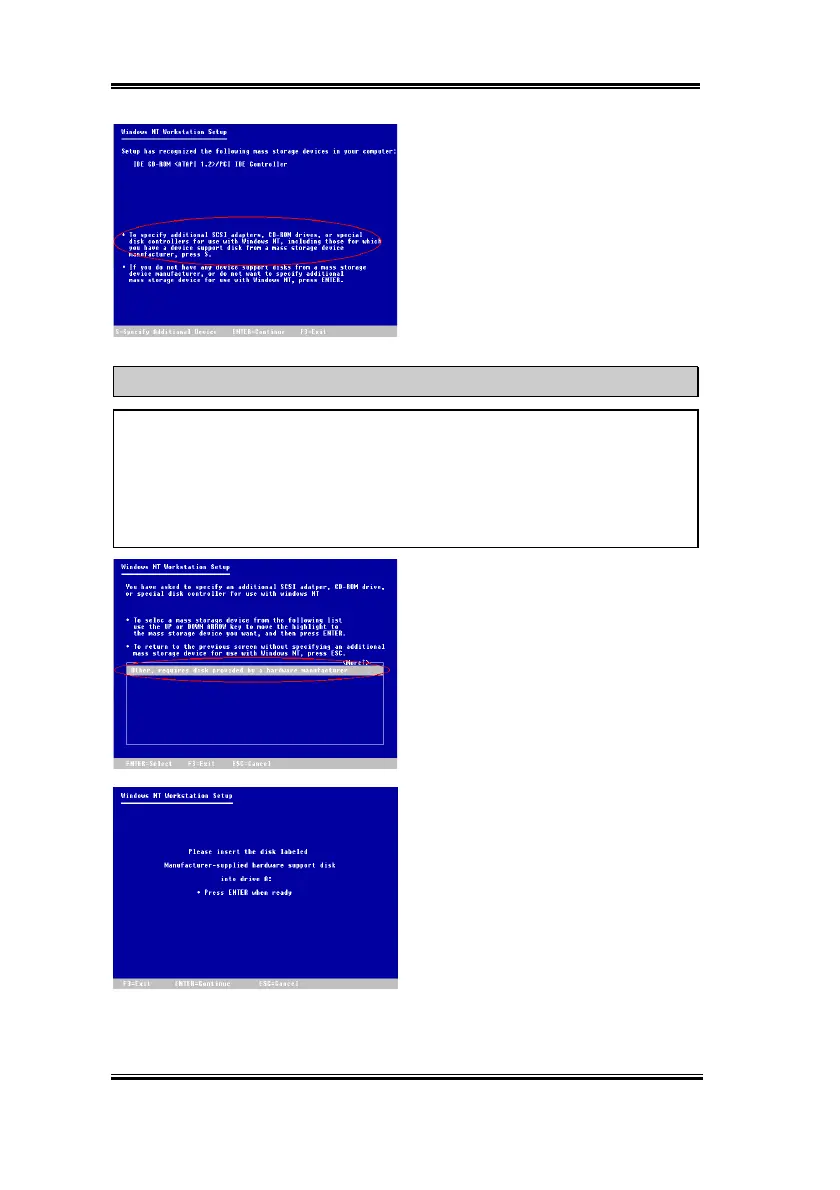
Step 2:
The setup program will display a
message about installing mass storage
devices (see figure left) while you install
NT4.0. Please press "
S
" to install Ultra
ATA/66 driver.
NOTE
There are two suitable times to press “
S
” to install the Ultra ATA/66 driver. One is before
the setup program autodetects your hardware. The other is after setup program
autodetects your hardware. If you choose the former, you will need to install every
device’s driver manually. Therefore, we suggest you letting the setup program
autodetects your hardware first, then press “S” to install the Ultra ATA/66 driver.
Step 3:
Select "
Other, requires disk
provided by a hardware manufacturer
",
and then press "
ENTER
".
Step 4:
Insert the Ultra ATA/66 driver disk
into drive A, then press "
ENTER
".



 To Next Page