EasyManua.ls Logo

Abit I-G31 - User Manual

Abit I-G31
24 pages
Print Icon
To Next Page IconTo Next Page
Loading...
I-G31
Motherboard
Intel Socket 775
Installation Guide

Questions and Answers

  • M
    Michele PatelAug 12, 2025
    What to do if Abit Motherboard fails to boot up and nothing displays on the screen after overclocking or non-standard BIOS settings?
    • R
      rbushAug 12, 2025
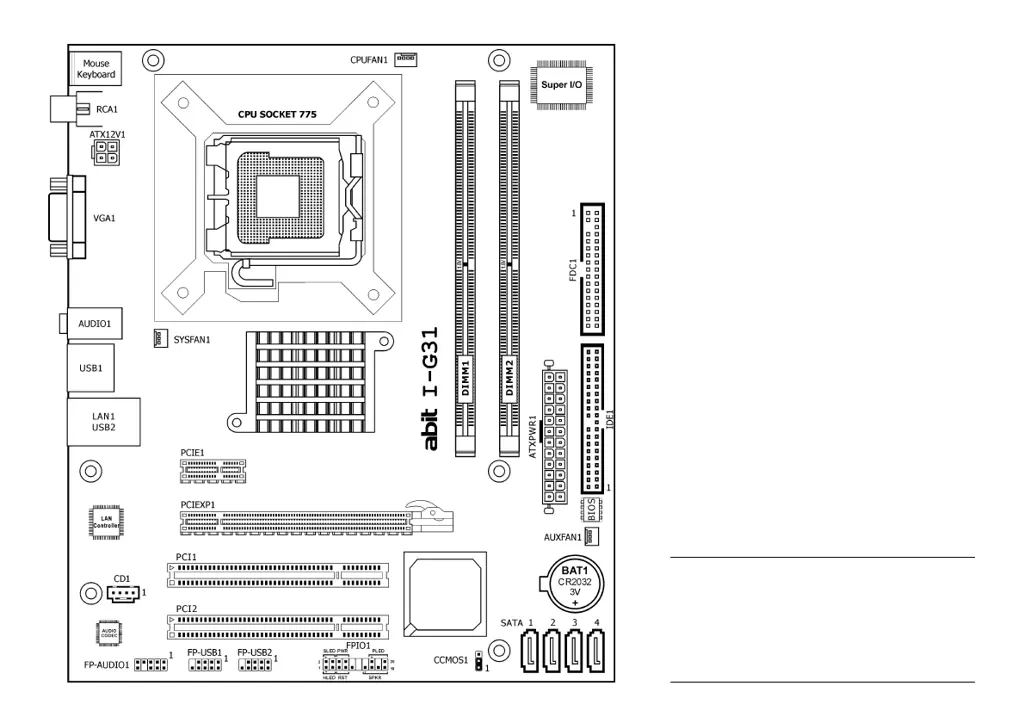
      If your Abit motherboard fails to boot after overclocking or using non-standard BIOS settings, try the following: First, switch off the power supply unit, wait one minute, and then switch it on again. While booting, press and hold the key. If that doesn't work, locate the CCMOS jumper, change its position from 1-2 to 2-3 for one minute to clear the CMOS data, then return it to the 1-2 position. As a last resort during CMOS discharge, pull out the ATX power connectors from the motherboard and remove the button battery.
  • H
    Haley HopkinsAug 21, 2025
    What to do if Abit Motherboard system boot-up fails after assembly?
    • J
      Jason HansenAug 21, 2025
      If your Abit motherboard system fails to boot after assembly, begin by checking the motherboard’s specifications to ensure all key components meet the requirements. Then, remove all unnecessary add-on devices, leaving only the CPU, VGA card, DRAM, and power supply connected, and try rebooting. If the issue persists, test with a different VGA card, memory module, CPU, and power supply, one at a time.
  • J
    Jacob JonesSep 1, 2025
    What to do if I have malfunction in the OS of Abit I-G31?
    • L
      Laurie BaldwinSep 1, 2025
      If you are experiencing OS malfunctions with your Abit motherboard, first upgrade to the latest BIOS version. Next, upgrade the latest driver versions for any add-on devices. Finally, check the 'Control Panel/System Properties' for any conflicts.

Abit I-G31 Specifications

General IconGeneral
Form FactorMicro ATX
Socket TypeLGA 775
Front Side Bus1333/1066/800 MHz
Memory Slots2
Memory StandardDDR2 800/667 MHz
Maximum Memory4 GB
SATA 3Gb/s4
IDE1
USB Ports8
AudioYes
Audio ChipsetRealtek ALC662
Audio Channels6
LAN ChipsetRealtek RTL8101E
Max. LAN Speed10/100 Mbps
LAN1
VGAYes
ChipsetIntel G31
Supported CPUIntel Core 2 Quad, Core 2 Duo, Celeron
Expansion Slots1 x PCI-E x16, 2 x PCI
Storage InterfaceSATA
PS/2Yes

Related product manuals