12
EN
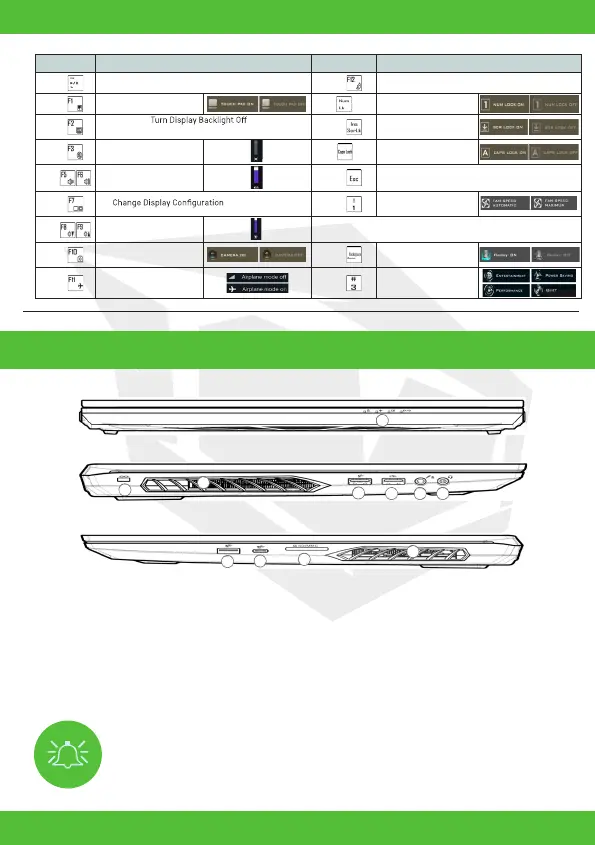
Figure 4 - Front, Left & Right Views (Model A)
Overheating
To prevent your computer from overheating make sure nothing blocks any
vent while the computer is in use.
System Map: Front, Left & Right Views
1. LED Indicators
2. Security Lock Slot
3. Vent
4. USB 3.2 Gen 1 Type-A Port
5. USB 2.0 Port
6. Microphone-In Jack
7. 2-In-1 Audio Jack (Headphone and Microphone)
8. USB 3.2 Gen 2 Type-A Port
9. USB 3.2 Gen 2 Type-C Port
10. Multi-in-1 Card Reader
t
Keys Function/Visual Indicators Keys Function/Visual Indicators
Fn +
Play/Pause (in Audio/Video Programs)
Fn +
Sleep Toggle
Fn +
Fn +
(Press a key to or use touchpad to turn on)
Fn +
Scroll Lock Toggle
Fn +
Mute Toggle
Touchpad Toogle
Caps Lock Toggle
Fn +
Volume Decrease/
Increase
Fn +
Control Center Toggle
Fn +
Fn +
Fan Automatic Control/
Full Power
Fn +
Display Brightness
Decrease/Increase
*Note: It is recommended that you use Maximum fan speed when
playing games.
Fn +
Camera Power
Toggle
Fn +
Disable/Enable
Flexikey®
Fn +
Airplane Mode Toggle
Fn +
Power Modes Toggle
t
Number Lock Toggle
t
t
1
3
4
8
5
3
9
6
7
10
t
1
2
3
4
8
5
3
9
6
7
10



 To Next Page