Page 23AN120076.000_EN
0
flashing
No.
Key
Description
Display
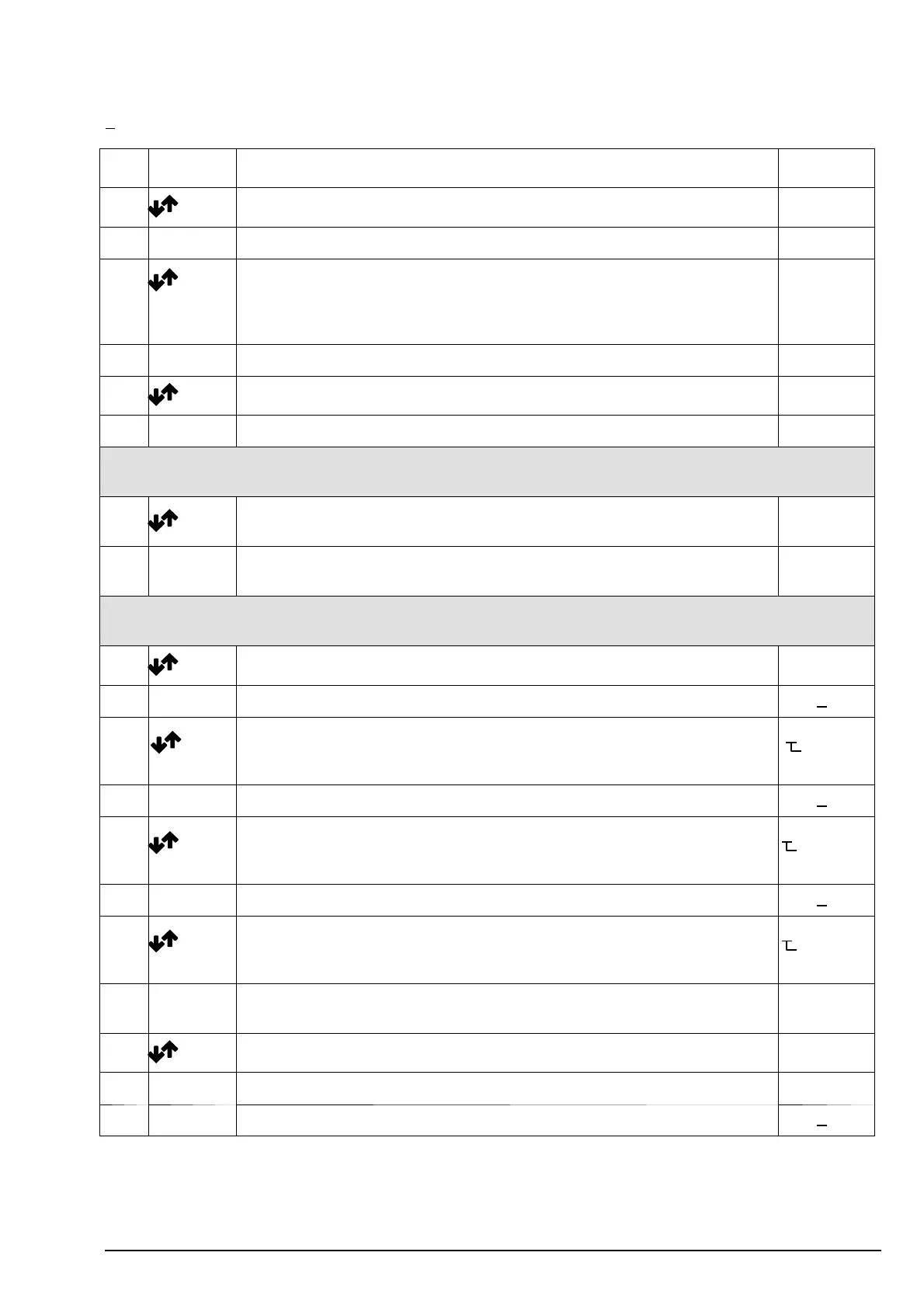
17 select parameter P 4. 2 part load switch 2 P4.2
18 Enter 0 or the value currently stored appears on display 0
19 enter required value e.g. 20 % for part load switch 2
( in % of load capacity, hoist 1 see parameter 0.1)
.
If the part- load switch is not active (module without switchi ng relay), this
setting is of no importance.
20 e.g.
20 Enter P 4.2 appears on display; value is stored P4.2
21 select parameter P 1. 1 motor type P1.1
22 Enter the motor type currently stored appears on display ––09 e.g.
For current–generation ABUS hoists (with L6 or H6 in model name), follow items 23a and 23b; then continue
with 31 (items 23 to 30 do not apply).
23a* Select motor type required from current measurement module allocation
table for GM hoists
––07 e.g.
23b*
Enter
“SP” flashes several times; motor data have been stored.
the display on the right appears
P1.1
Items 23a und 23b do not a pply to ABUS hoists (not included in chapter 13) and non–ABUS hoists or hoists
with power supply voltages other than 400 V. Continue with item 23.
23 select motor t ype 0 ––00
24 Enter confirm by pressing ENTER. The display on the right appears 0.00 0 (#)
25
+
Enter
enter precision lift winding resistance in one phase (in Ohms) working from
right to left; confirm each digit with ENTER
12.31 z.B.
flashing
(#)
26 Enter confirm the last digit by pressing ENTER: the display on the right appears 0.00 0 (#)
27
+
Enter
enter main lift winding resistance in one phase (in Ohms) working from right
to left; confirm each digit with ENTER
2.350 z.B.
flashing
(#)
28 Enter confirm the last digit by pressing ENTER: the display on the right appears 0.00 0 (#)
29
+
Enter
enter current correction factor taken from table (measuring ranges of cur-
rent measuring modules) working from right to left; confirm each digit with
ENTER
0613 e.g.
flashing
30 Enter confirm the last digit by pressing ENTER: SP flashes several times; motor
data have been stored: the display on the right appears
P1.1
31 select parameter P 2. 3 Tea ch – I n P2.3
32 Enter the display on the right appears Last
33 Enter press for about 1 sec. and release: the display on the right appears
0.00 0 (#)
(#) see page 26 ”Notes”



 To Next Page