31
English
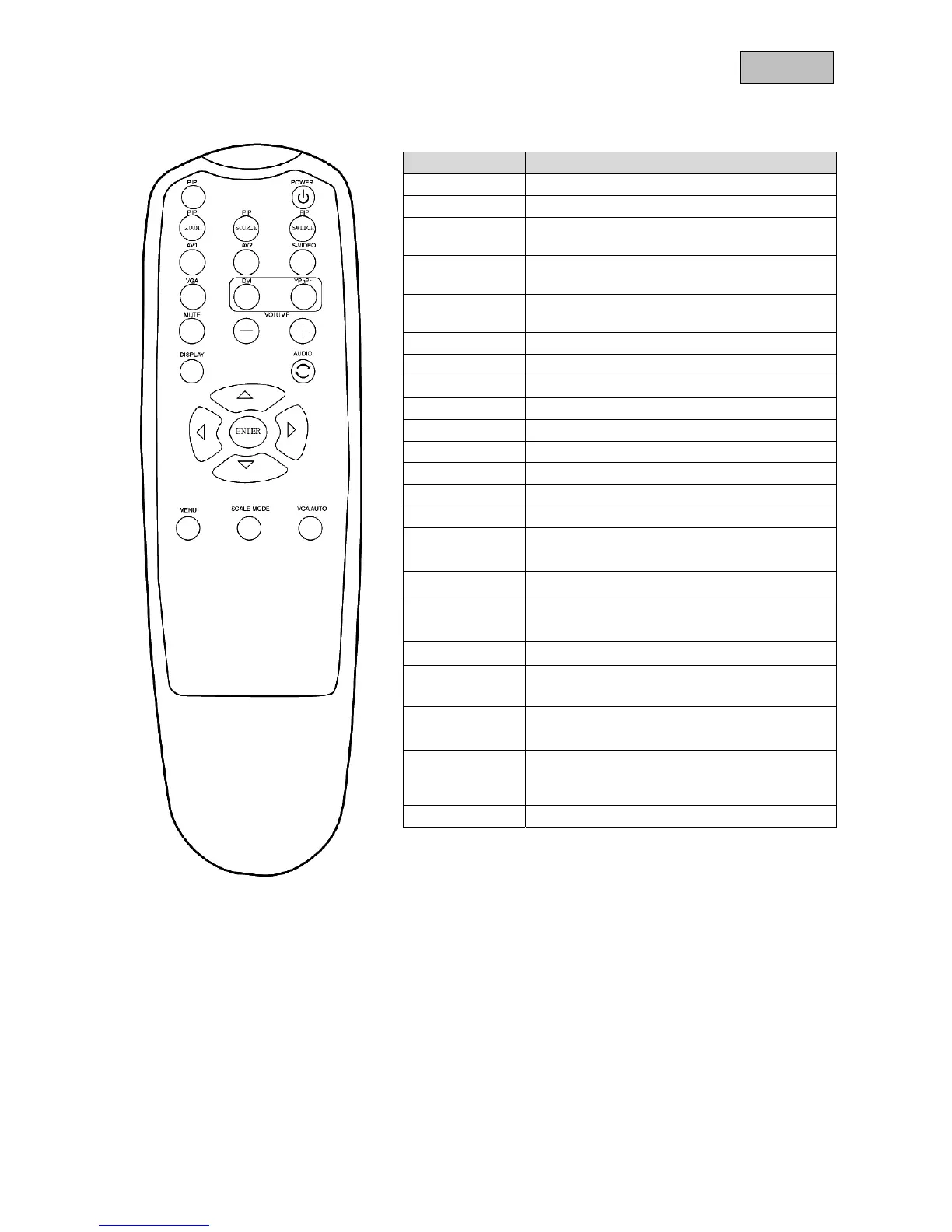
9. Button description of the remote control
Button Function
PiP Mode Select the PIP mode
POWER Switch monitor on / off
PIP-ZOOM
Select the picture-in-picture size:
Off/ PIP small / PIP large/ POP
PIP-SOURCE
Select the input for the Picture-in-Picture
function
PIP-SWITCH
With this function you can swap the main
picture with the overlaid picture.
AV1 AV1 (analogue video input)
AV2 AV2 (analogue video input)
S-VIDEO S-Video (analogue video input)
VGA VGA (PC or DVR signal input)
MUTE Switch off loudspeakers
VOLUME - Reduce the volume
VOLUME + Increase the volume
DISPLAY Displays the source information
AUDIO Swap No function
5
Increase the value in the OSD,
Call a menu item
3
Reduce the value in the OSD
ENTER
Confirm a selected value,
Select a menu item for adjustment
4
Increase the value in the OSD
6
Select a menu item for adjustment ,
Reduce the value in the OSD
MENU
Show the OSD (on-screen display),
Switch between menu items
SCALE MODE
Screen view settings.
You have the following options:
Full scan, overscan, underscan
VGA AUTO Automatic adjustment of the desktop display.



 To Next Page