EasyManua.ls Logo

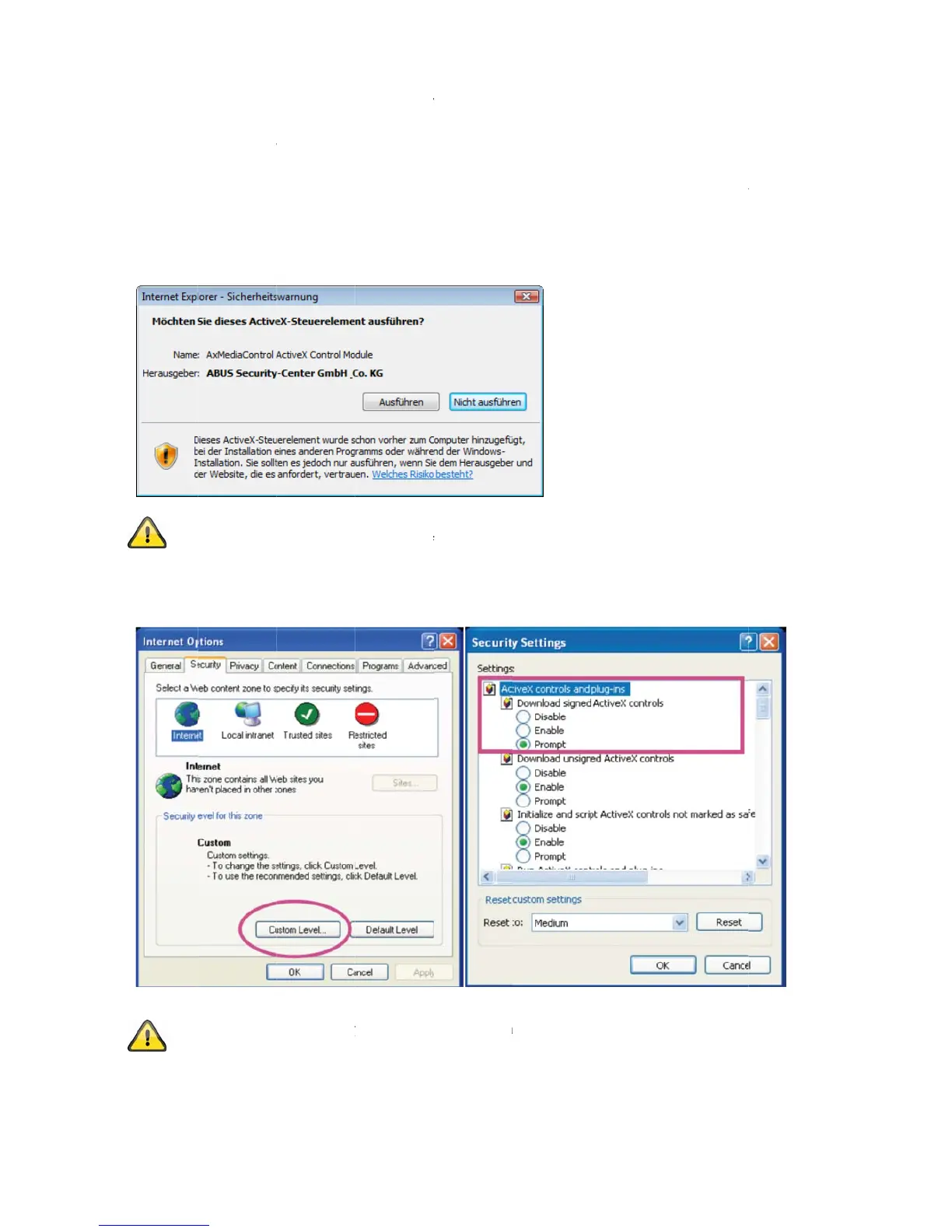
Abus TVIP10055B - 4.6 Accessing via Web Browser; 4.8 Adjusting Security Settings

Abus TVIP10055B
125 pages
Print Icon
To Next Page IconTo Next Page
To Previous Page IconTo Previous Page
Loading...
4.6 Acc
e
When yo
u
A
ctiveX pl
highest s
e
used for d
installatio
n
administr
a
4.7 Inst
a
4.8 Adj
u
e
ssing th
e
u
first acces
s
l
ug-in for the
e
curity level i
d
isplaying th
e
n
, open the I
a
tor.
a
lling the
A
If Mozilla
F
provided
b
u
sting the
Note: Yo
u
settings t
o
A
ctiveX c
o
e
network
s
the networ
k
network ca
m
s set, the P
C
e
video in th
e
nternet sec
u
A
ctiveX p
l
F
irefox is us
e
b
y the came
r
security
s
u
r PC securit
y
o
a lower lev
e
o
ntrols and
d
camera o
v
k
camera un
d
m
era. This q
C
will refuse
e
browser. T
o
u
rity settings
l
ug-in
e
d as the br
o
r
a instead of
s
ettings
y
settings m
a
e
l under “To
o
d
ownloads.
12
ver a we
b
d
er Window
s
uery depen
d
any installat
o
continue,
c
and reduce
o
wser when
f
the ActiveX
a
y prevent
a
o
ls / Interne
t
b
browser
s
, the web b
r
d
s on the Int
e
i
on and any
c
lick “Install”
.
the security
accessing t
h
plug-in.
a
video strea
m
t
Options / S
e
o
wser queri
e
e
rnet securit
y
a
ttempt at r
u
If the web
b
level or con
s
h
e camera,
a
m
. You can
c
e
curity”. Ma
k
e
s the install
y
settings of
u
nning it. Thi
b
rowser pre
v
s
ult your IT
o
a
n MJPEG s
t
c
hange the
s
k
e sure you
e
ation of an
your PC. If t
s plug-in is
v
ents the
o
r network
t
ream is
s
ecurity
e
nable
he

Table of Contents

Related product manuals