18
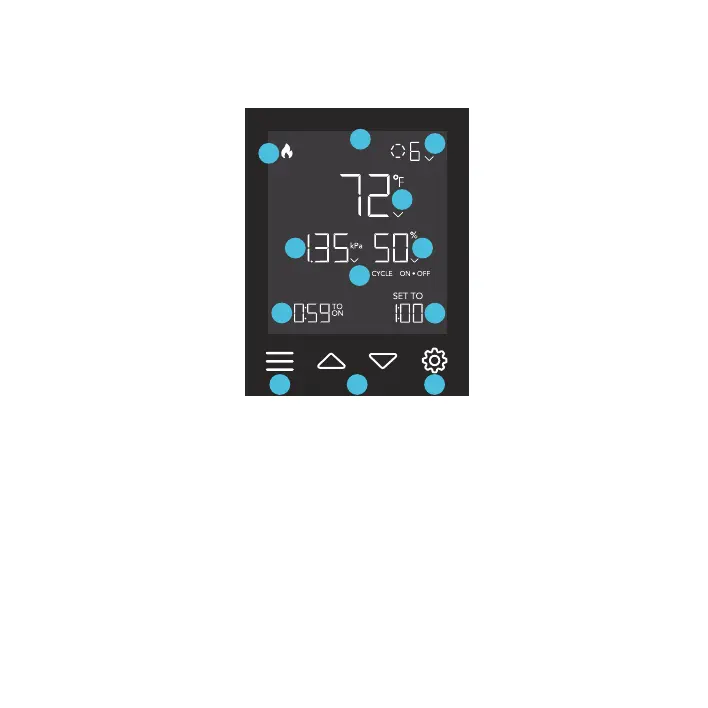
PROGRAMMING
1
2
3
4
6
8
9
10
11
12
5
7
3. SETTING BUTTON
Cycles through the controller’s
settings: °F / °C, CALIB. T° /
H%, and LEAF OFFSET.
2. UP/DOWN BUTTONS
Adjusts the value of your current
mode. The up button increases
and down button decreases
the setting. Hold both to reset
values to OFF/Default.
1. MODE BUTTON
Cycles through the controller’s
modes: OFF, ON, AUTO, VPD,
TIMER TO OFF, and CYCLE
(ON and OFF).
6. PROBE HUMIDITY
Displays the current humidity that
the probe is measuring. Shows "--"
if no probe is plugged in. Includes
a trend indicator that signals a rise,
stability, or fall in humidity within
the last hour.
4. PROBE TEMPERATURE
Displays the current temperature
that the probe is detecting. Shows
“--” if no probe is plugged in.
Includes a trend indicator that
signals a rise, stability, or fall in
temperature within the last hour.
11. ALERT ICONS
Displays alerts and statuses
of the controller, including
the controller lock, CLIMATE
alert, and TIMER alert.
9. USER SETTING
Displays the value of your
current mode. Use the up or
down buttons to adjust the value.
10. COUNTDOWN
Displays the countdown
of the TIMER TO OFF, or
CYCLE Mode that activates
or deactivates your heater. TO
ON shows the amount of time
left before it turns on. TO OFF
shows the amount of time left
before it turns off.
8. CURRENT LEVEL
Displays the current setting.
Includes a trend indicator that
signals if the setting is currently
rising, falling, or holding steady.
7. CONTROLLER MODE
Displays the controller's
current mode. Pressing the
mode button cycles through
the available modes.
5. PROBE VPD
Displays the current VPD that
the probe is detecting (in kPa).
Shows “--” if no probe is plugged
in. Includes a trend indicator that
signals a rise, stability, or fall in
VPD within the last hour.
12. FUNCTION MODE
Displays which function
your heater is in between
HEAT and FAN.



 To Next Page