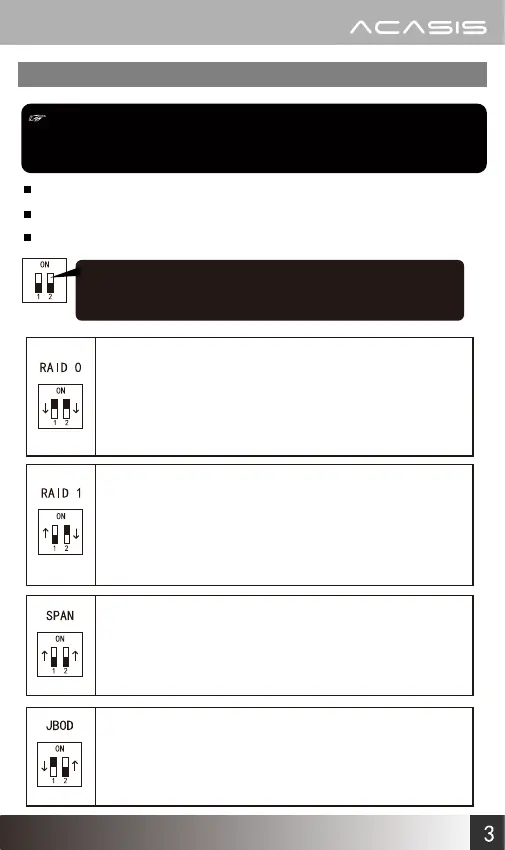
RAID setting
Notice:
Data will be deleted when setting RAID
modes, please backup your data first!
There are 4 RAID modes supported
The default mode is JBOD
Set the RAID mode with switches
Note: The white part represents the dip
switch position
www.acasis.com
SPAN: Recognize one drive and the capacity is the sum of the two
hard disks
Example: 1000GB+750GB=1750GB
Setting: Set both switches upward
Note: The computer will recognize it as a mass storage device
RAID 0: Recognize one drive and the capacity is twice the smaller
hard disk's
Example: 1000GB+750GB=1500GB
Setting: Set both switches downward
Note: Read from and write to two disks simultaneously to get
faster speed.If any hard disk fails, all data will be lost
RAID 1: Recognize one drive and the capacity is the smaller hard
disk Data will be backuped to another hard disk at the
same time
Example: 1000GB+750GB=750GB
Setting: Set No.1 Switch upward, Set No.2 Switch downward
Note: If any hard disk fails, all data is still well reserved
JBOD: Recognize two hard drives (factory default setting mode)
Setting: Set No.1 Switch downward, Set No.2 Switch upward
Note: The computer will recognize two independent hard drives
separately. It is the recommended mode, if just one hard
disk will be used


 To Next Page