Page 12 of 18 Copyright © Access-IS 2019
3.4 NFC/RFID installation guidelines
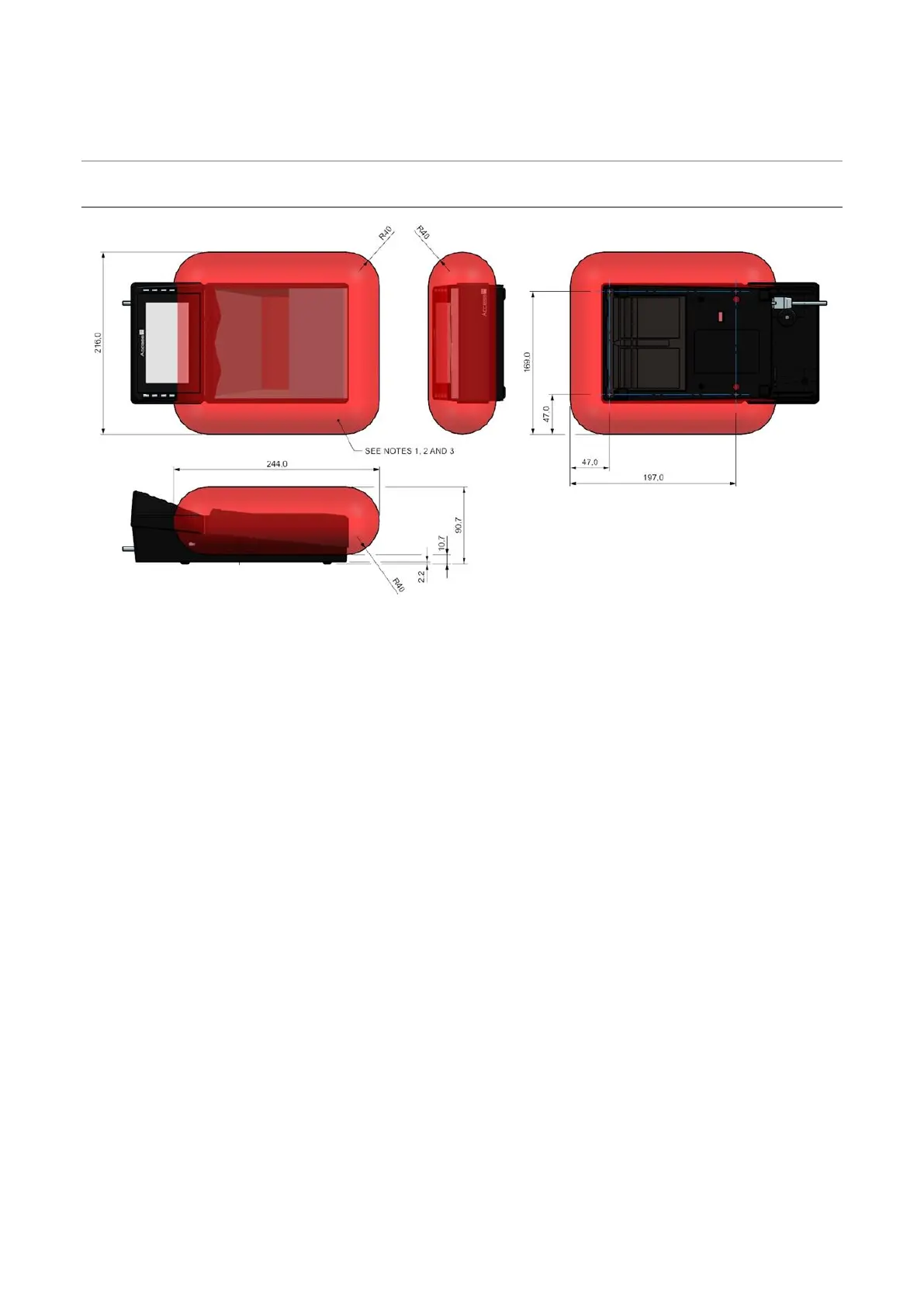
To optimise the performance of your Access-IS device DO NOT install it with its NFC/RFID antenna
within 40 mm of a large metal or electrically-conductive component or structure.
Important: Failure to observe this instruction may lead to the product’s NFC performance
deteriorating or even failing completely.
Figure 8: BGR750 NFC/RFID installation guidelines
Notes:
1. RFID functionality is directly affected by electrically-conductive components: ideally it is best to
avoid placing metallic components near the unit.
2. No metal components should enter the areas indicated by the red transparent zone as they will
directly affect the RFID performance.
3. If metalwork in the red transparent regions cannot be avoided, please contact Access-IS before
installation.
3.5 Configure the BGR750
There are two methods to configure the BGR750, including setting the host protocol:
1. Using the BGR Configuration Tool, which you can download from the Access-IS website
(http://www.access-is.com/gettingstarted/).
2. Using a configuration barcode provided by Access-IS.


 To Next Page