| 6
SMART PIPETTE - USER GUIDE
PIPETTE OPERATION
Setting the Volume
With the SMART pipette, the delivery volume of liquid is set using the
digital counter. A pointer is used to set exact or intermediate volmes
using the scale on the last wheel of digital counter. In some of the
variable volume pipettes, counter wheels are in black & grey color.
Grey wheel indicates value after the decimal.
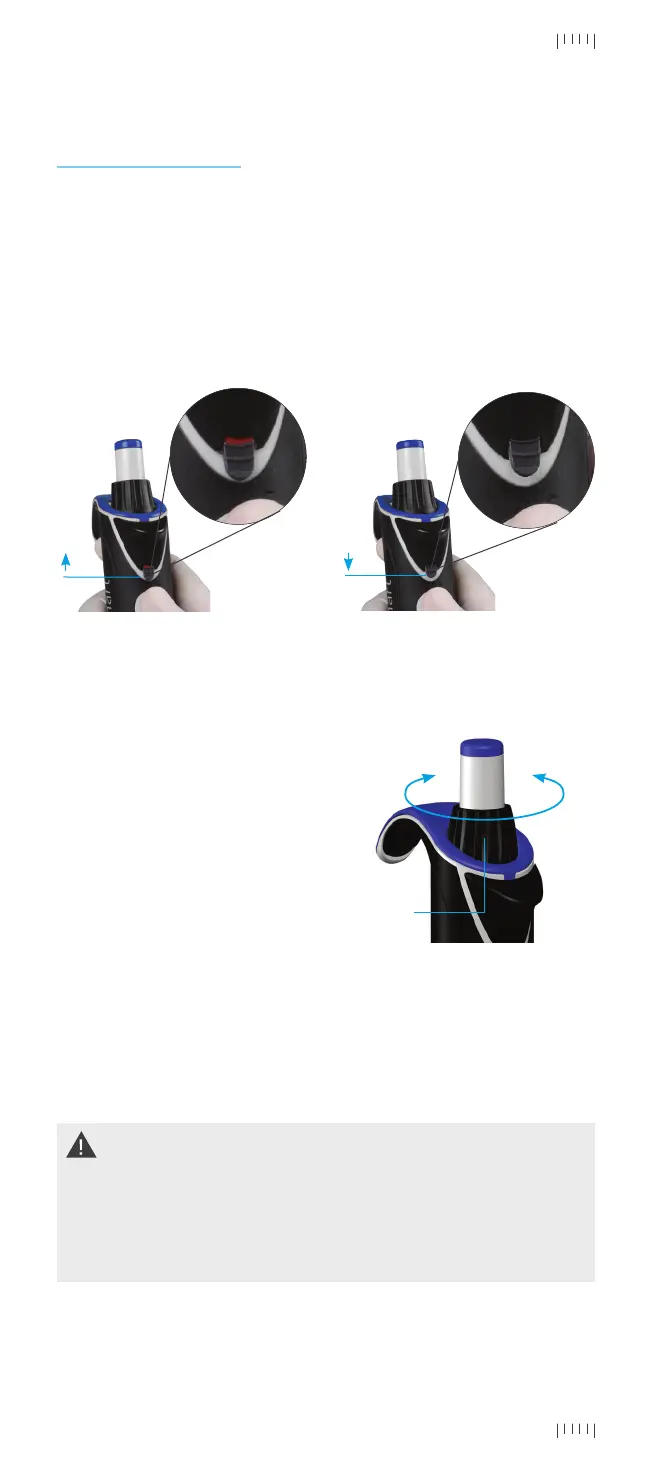
You can set the delivery volume
using the volume changing knob
on the upper side of pipette after
unlocking the counter by pulling
up the counter lock. To decrease
the delivery volume, turn it
clockwise and to increase, turn
it anti-clockwise. Do make sure
that the desired delivery volume is
set in-line with pointer. Pull down
the lock to ensure that volume
doesn’t accidently changed during
pipetting.
- +
Volume
Changing
Knob
Push up to un-lock
Locked Position Un-locked Position
Pull down to Lock
1) Counter lock mechanism is to ensure volume changing knob remains in its
position while aspirating or dispensing liquids. Any forced efforts to rotate the
volume changing knob while counter lock mechanism is in lock position will either
make it in unlock position or may damage the locking mechanism.
2) Setting the volume beyond the specified volume range is not advisable. Using
excessive force to turn the volume-changing knob outside the specified range,
may jam the mechanism and eventually damage the pipette.


 To Next Page