7
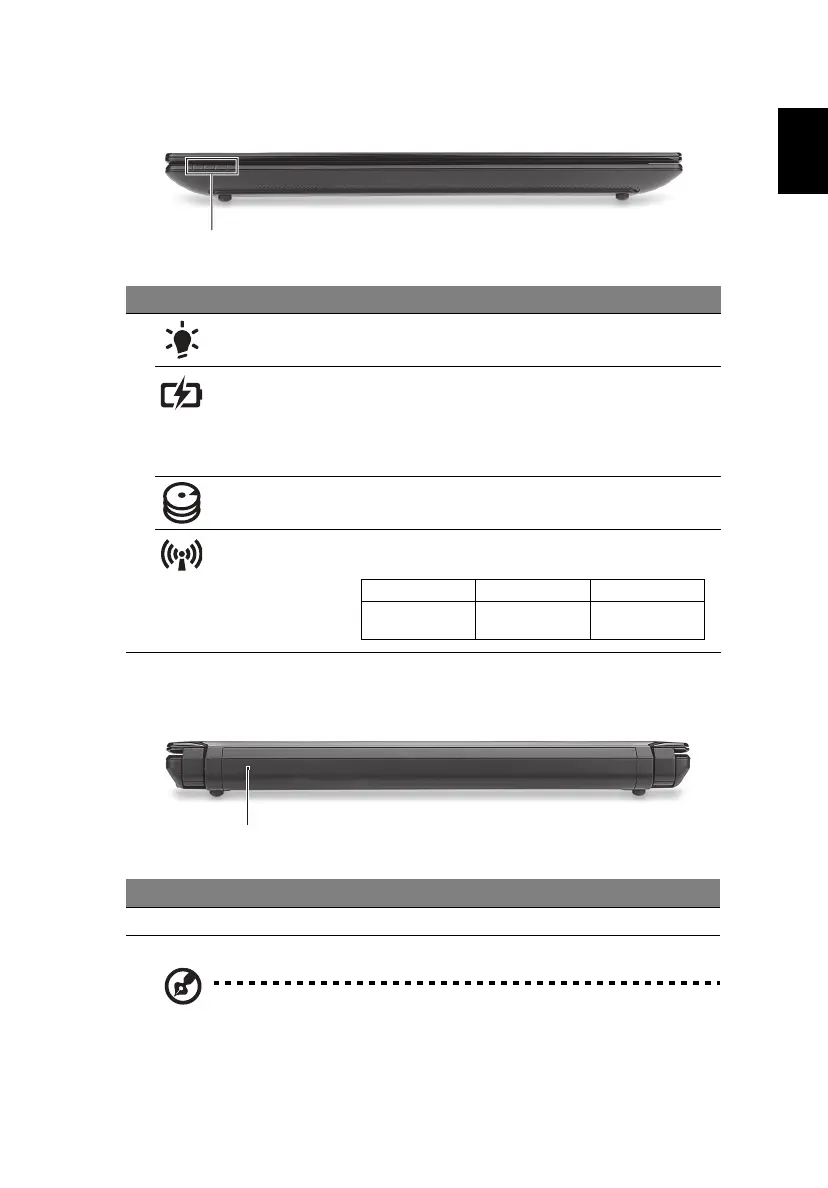
Closed front view
Rear view
Note: Your computer may be equipped with a different battery to
the one in the picture.
# Icon Item Description
1 Power indicator Indicates the computer's power status.
Battery indicator Indicates the computer's battery status.
1. Charging: The light shows amber when the
battery is charging.
2. Fully charged: The light shows blue when in
AC mode.
HDD indicator Indicates when the hard disk drive is active.
Communication
indicator
Indicates the status of 3G/Wireless LAN
communication
# Item Description
1 Battery bay Houses the computer’s battery pack.
Blue light on Orange light on Not lit
3G on / Wi-Fi on
3G on / Wi-Fi off
3G off / Wi-Fi on 3G off / Wi-Fi off


 To Next Page
 Loading...