To Next Page

A
Andrea SantosJul 26, 2025
How to fix power on issue on Acer Laptop?
- PPaul PattersonJul 26, 2025
If your Acer Laptop has a power on issue, try to check or swap the AC adapter or battery. If that doesn't work, try swapping the motherboard.

How to fix power on issue on Acer Laptop?
If your Acer Laptop has a power on issue, try to check or swap the AC adapter or battery. If that doesn't work, try swapping the motherboard.
What to do if built-in keyboard fails on Acer ASPIRE 5745 Laptop?
If your Acer Laptop has a built-in keyboard failure, try disconnecting and reconnecting the keyboard. If that doesn't work, replace the keyboard. As a last resort, replace the mainboard.
What to do if TouchPad fails on Acer ASPIRE 5745?
If the touchpad on your Acer Laptop is not working, try re-assembling the TouchPad FFC to the motherboard. If the issue persists, consider swapping the motherboard.
How to troubleshoot internal speaker failure on Acer ASPIRE 5745 Laptop?
If your Acer Laptop's internal speaker is not working, check the M/B SPK cable connection to the motherboard. If the problem continues, try swapping the motherboard.
What to do if my Acer Laptop shuts down intermittently?
If your Acer Laptop is shutting down intermittently, try these steps: Ensure the power cable is properly connected to both the laptop and the electrical outlet. Remove any extension cables or surge protectors between the laptop and the outlet, plugging directly into a known good outlet. Remove any external and non-essential hardware. Finally, remove any recently installed software.
What to do if HDD not operating correctly in Acer ASPIRE 5745 Laptop?
If your Acer Laptop's HDD is not operating correctly, try these steps: Disconnect all external devices. Run a complete virus scan. Run the Windows 7 Startup Repair Utility. Check the BIOS settings to ensure they are correct and that the CD/DVD drive is set as the first boot device. Remove any recently added hardware and associated software. Run Windows Check Disk by entering chkdsk /r from a command prompt.
How to fix USB failure on Acer ASPIRE 5745 Laptop?
If your Acer Laptop has a USB failure (right up/down side), try re-assembling the USB/B cable to the motherboard. If that doesn't work, try swapping the USB/B and checking it. As a final step, swap the motherboard.
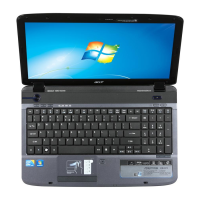
Button to turn the computer on and off.
Used for entering data into the computer.
Touch-sensitive pointing device functioning as a mouse.
Liquid-Crystal Display showing computer output.
Connects the computer to an AC adapter.
Connects to external display devices.
Supports high definition digital video connections.
Connects to USB 2.0 devices.
 General
| Resolution | 1366 x 768 |
|---|---|
| RAM | Up to 8 GB DDR3 |
| Operating System | Windows 7 Home Premium |
| Battery | 6-cell Li-ion |
| Chipset | Intel HM55 Express |
| Optical Drive | DVD-Super Multi DL drive |
| Wireless | 802.11b/g/n |
| LAN | Gigabit Ethernet |
| Card Reader | 5-in-1 card reader |
| Weight | 2.6 kg |
| Processor | Intel Core i3/i5/i7 |
| Display | 15.6 inch |
| Storage | 500 GB HDD |
| Graphics | NVIDIA GeForce GT 330M |
| Ports | 3 x USB 2.0, 1 x HDMI, 1 x VGA |
| Dimensions | 381 x 253 x 25/34 mm (15 x 9.96 x 0.98/1.34 inches) |