7
English
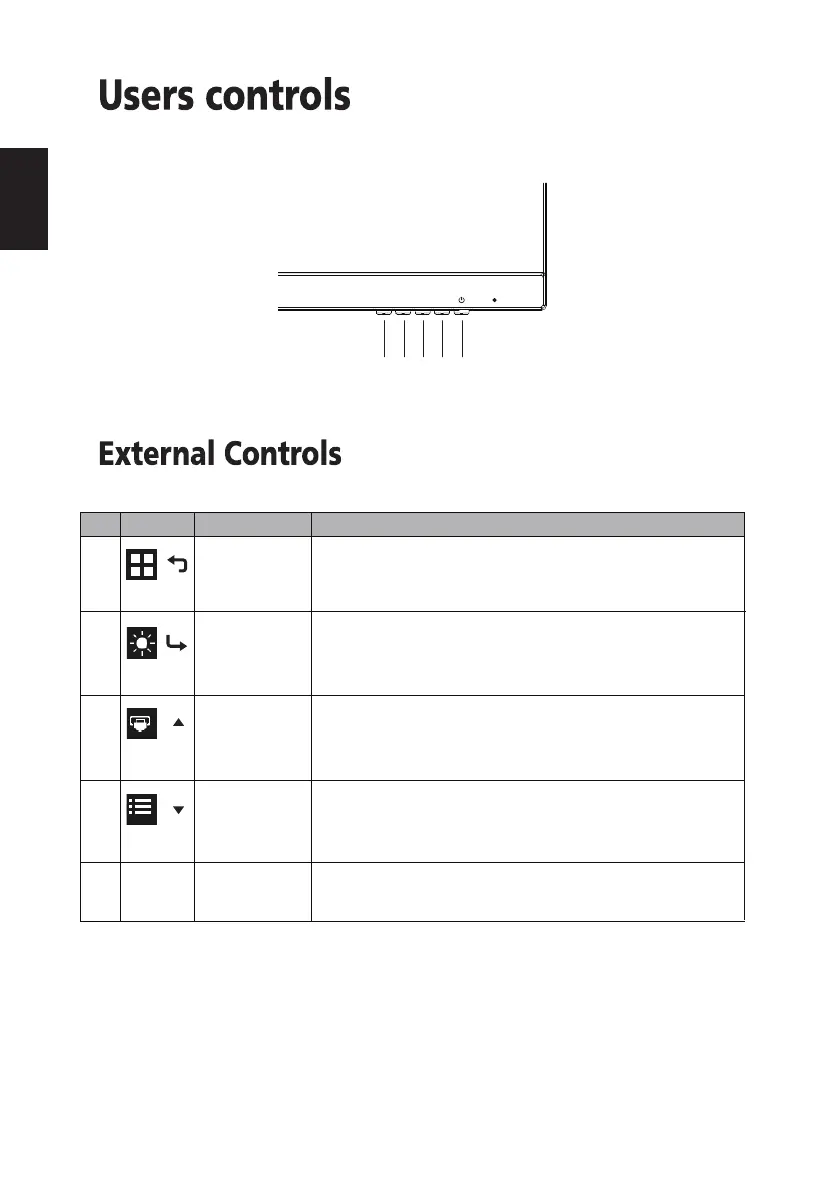
Turns the monitor on/off.
Blue indicates power on. Orange indicates standby/power
saving mode.
No. Icon Item Description
1
Mode/Exit
2
Brightness/
Enter
Input/-
3
4 Menu/+
5 POWER Power button
/
/
/
/
a. Press to view Main page. Press again to enter mode select
function.
b. When the Function Menu is active. Press to return previous
Menu or exit current Menu.
a. Press to view Main page. Press again to enter brightness
adjustment function.
b. When the Function Menu is active, this button will enter a
selection in the OSD.
a. Press to view Main page. Press again to enter Input select
function.
b. When the Function Menu is active, press this button selected
or move to the previous function.
a. Press to view Main page. Press again to enter next function
in the Function Menu.
b. When the Function Menu is active, press this key selected or
move to the next function.
1 2 3 4 5


 To Next Page
 Loading...