Installation
To install the monitor on your host system, please follow the steps below:
Steps
In order to prevent damage to the monito
Note:
Audio output is only for audio output model.
r, do not lift the monitor by its base.
6
English
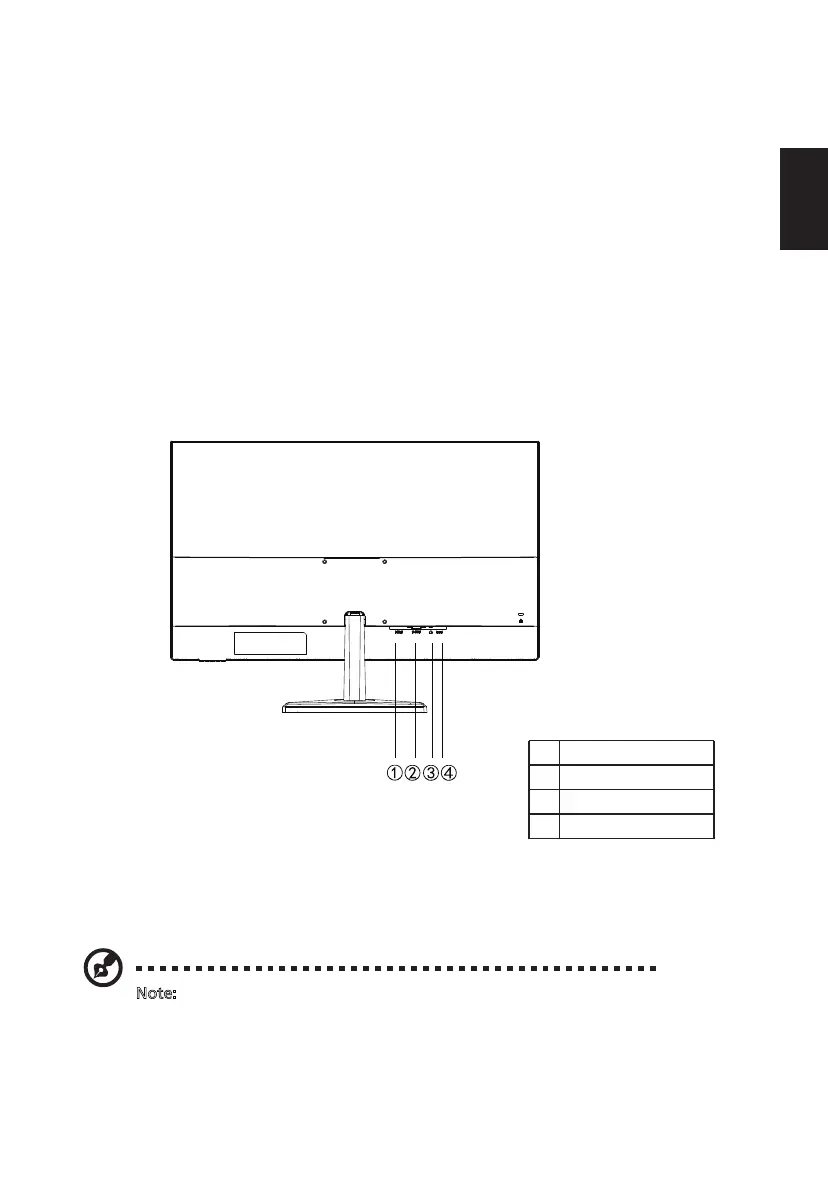
1 HDMI
D-Sub (VGA)
Audio out
DC-19V
2
3
4
1. Turn off your monitor and unplug your computer’s power cord.
3. Connect the Audio Cable. (Only Audio-out Model) (Optional)
4. Insert the monitor power cable into the power port at the back of the monitor.
5. Plug the power cords of your computer and your monitor into a nearby electrical outlet.
2. 2-1 Connect VGA Cable (Only VGA-input model)
a.Make sure both the monitor and computer are powered-OFF.
b.Connect the VGA cable to the computer.
2-2 Connect HDMI Cable (Only HDMI-input model)
a. Make sure both the monitor and computer are powered-OFF.
b. Connect the HDMI cable to the computer.


 To Next Page