13
English
System Setting
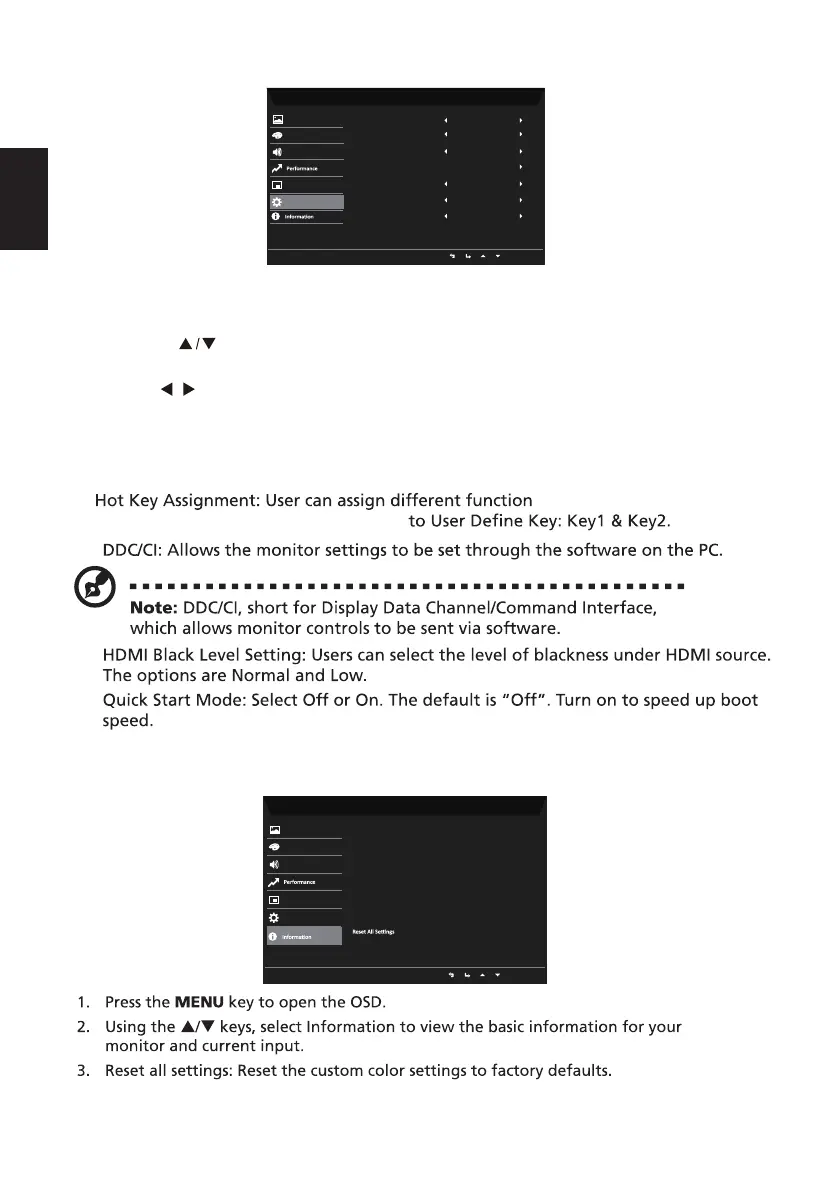
1. System menu can be used to select signal input sources and other important settings.
2. Press the MENU key to open the OSD.
3. Using the keys, select Setting from the OSD. Then navigate to the setting you
wish to adjust.
8.
9.
10.
11.
4. Use the keys to select the setting.
5. Input: Select the source from VGA or HDMI.
6. Auto Source: Automatically searches for available input sources.
7. Wide Mode: You can select which screen as pect you are using. The options are Aspect
and Full.
( Brightness/Input/Volume/
Gamma/contrast/Bluelight/Over Drive)
/
Product information
Mode - Standard
Picture
Color
HDMIInput
Audio
OSD
System
FullWide Mode
Quick Start Mode Off
Hot Key Assignment
Auto Source On
NormalHDMI Black Level
DDC/CI
On
Mode - Standard
Picture
Color
Main Source
HDMI
Audio
OSD
System
H/V Frequency
H:68 KHz V :60Hz
Mode
Normal
Resolution
1920x1080
Series Number
PPPPPPPPPP012345678912
Exit



 To Next Page