9
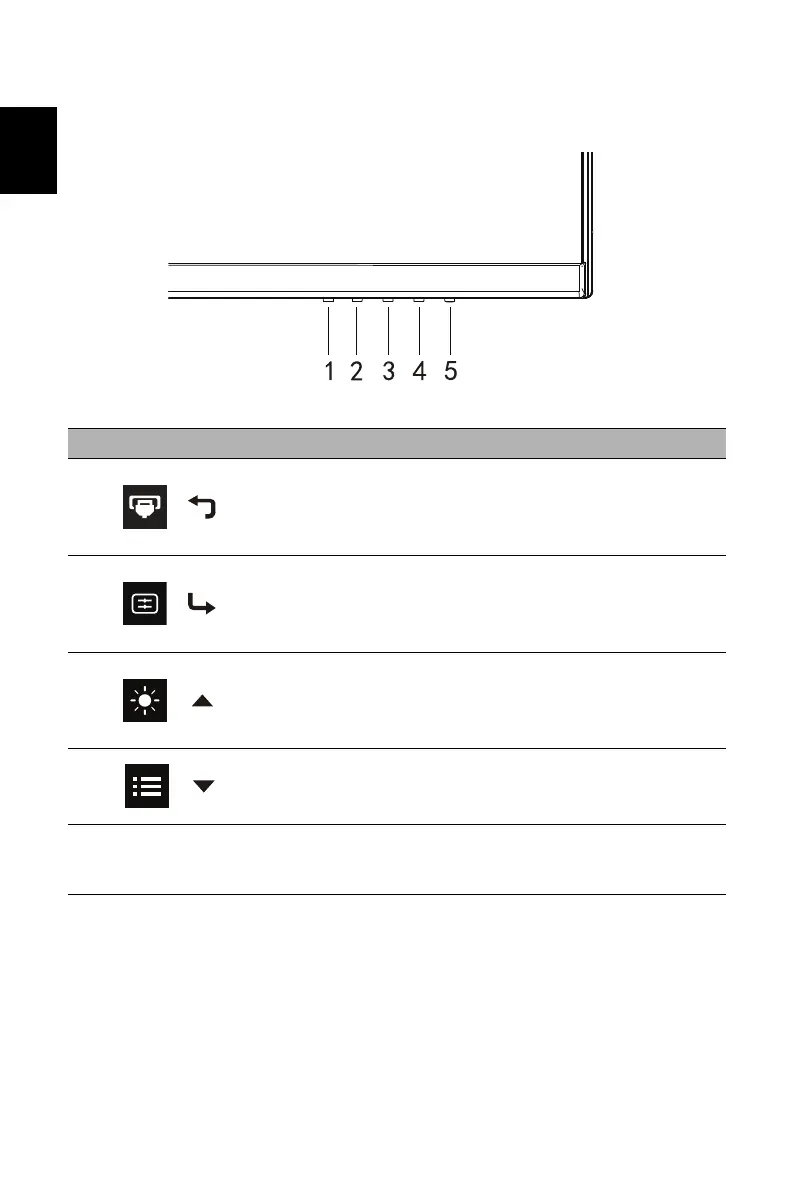
External Controls
FreeSync Premium Pro(HDMI/DP Only):
It c
an allow a FreeSync Premium Pro supported graphics source to dynamically
adjust display refresh rate based on typical content frame rates for power efficient,
virtually stutter free and low-latency display.
No. Icon Item Description
1
/
Input button/Exit
a. Press to trigger Mode control.
b. When the OSD menu is enabled,
press to exit the current menu and go
back one level.
2
/
Mode/Enter
a. Press the key to open the Brightness
control.
b. When the OSD menu is enabled,
press to enter to next level.
3
/
Brightness/+
a. Press to toggle input sources.
b. When the OSD menu is enabled,
press to select or return to the
previous menu.
4
/
OSD functions/-
a. Press to view the OSD.
b. When the OSD menu is enabled,
press to select or go to the next menu.
5 POWER Power button
Turns the monitor on/off. Blue indicates
power on.
Blinking Blue indicates standby mode.


 To Next Page