Ports
2 Quick Guide
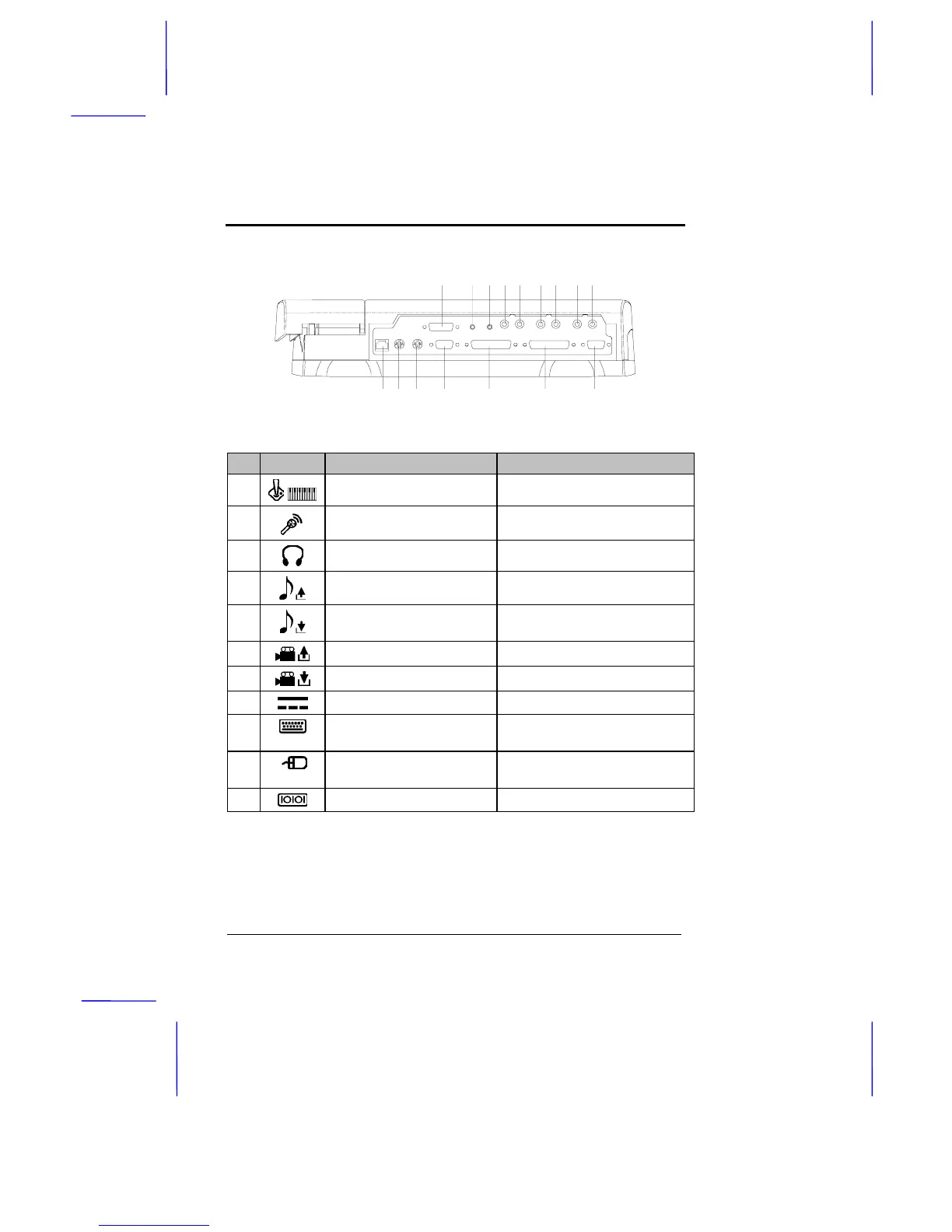
Rear Ports
1 2 3 4 5 6 7 8 9
10 11 12 13 14 15 16
The rear ports and their descriptions are listed below:
# Icon Port Connects to...
1
Joystick/MIDI port Joystick, gamepad or MIDI device
2
Microphone-in jack Microphone
3
Speaker-out/ headphone jack Amplified speakers or headphones
4-5
Stereo line-out jack (R-L) Stereo amplifier
6-7
Stereo line-in jack (R-L) Audio CD player, stereo walkman,
synthesizer
8
NTSC/PAL video output jack TV signal
9
NTSC/PAL video input jack Video source
10
DC-in port AC adapter and power outlet
11
PS/2 keyboard/ keypad port PS/2-compatible keyboard or
keypad
12
PS/2 mouse port PS/2-compatible pointing device
(e.g., PS/2 mouse)
13
9-pin serial port Serial device (e.g., serial mouse)



 To Next Page