14
PIC26-2
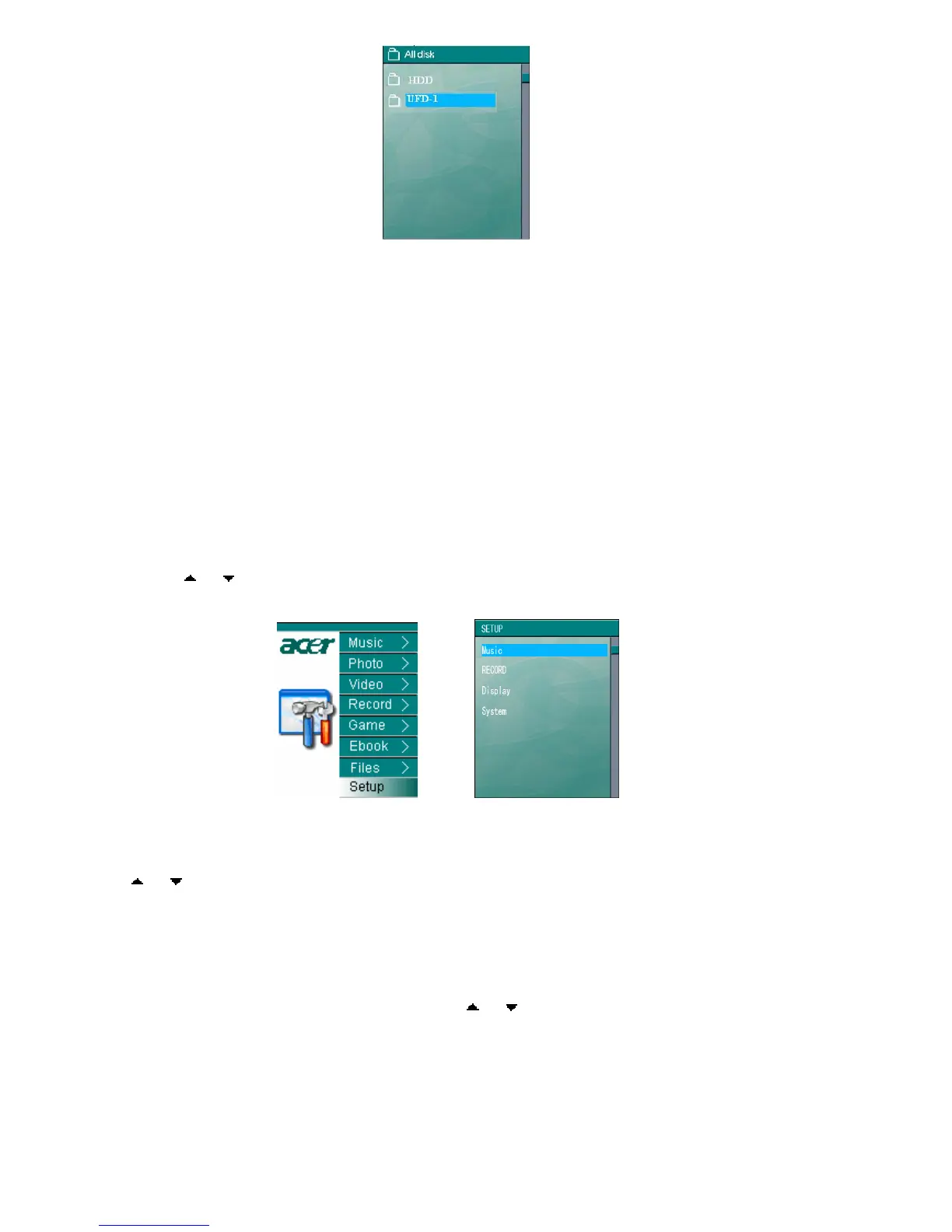
3) Select UFD-1 and press “ENTER” to the directory system of the external storage
device. Select the wanted folder or file, and then press “MODE”. The ejected
interface will show as PIC 27 and any operation of copying or deleting can be taken.
Long press ”ESC” for 2 second to return to the main menu
Notes:1)All the copying, no matter single file or the whole directory, will be stored under
the Filecopy directory.
2)It could not play the music, video, picture and text files directly in the external
storage device.
10 Setup
Select “Setup” under the main menu, see PIC 28 and press “ENTER” to the setup interface
as in PIC 29. There are four options, namely Music, Record, Display and System settings.
Press “ ”or“ ”to choose the wanted option and press “ENTER” to the detailed setting
interface.
PIC28 PIC 29
10.1 Music Setup
Under Music Setup interface, there are two modes- Repeat Mode and Equalizer. Press
“
”or“ ”to choose any of the two modes and press “ENTER” to its detailed setting interface.
Press “ESC” to return to the previous menu; Long Press “ESC” for 2 second to return to the
main menu directly.
Repeat Mode: This interface contains 5 options, namely Normal, Repeat Dir. Repeat One,
Repeat Folder, random, and Intro. Press “ ”or“ ” to choose any of the five and press
“ENTER” for confirmation. This is to set Repeat playing modes of songs.



 To Next Page