22
English ...
User Controls
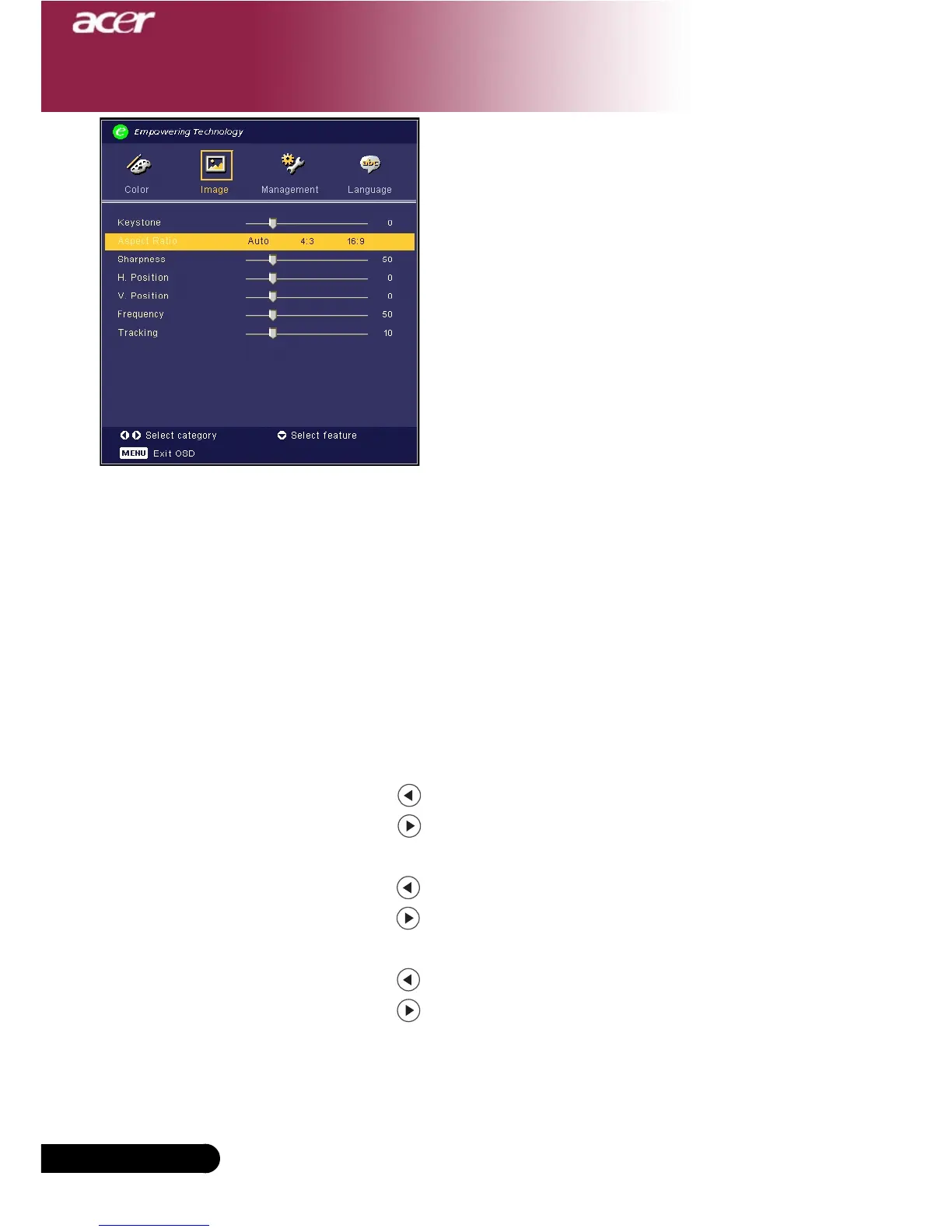
Keystone
Adjust image distortion caused by tilting projection. (±8 degrees)
Aspect Ratio
Use this function to choose your desired aspect ratio.
4
4:3 : The input source will be scaled to fit the projection screen.
4
16:9 : The input source will be scaled to fit the width of the screen.
4
Auto : Keep the image with original width-higth ratio and maximize the
image to fit native horizontal or vertical pixels.
Sharpness
Adjusts the sharpness of the image.
4
Press the to decrease the sharpness.
4
Press the to increase the sharpness.
H.Position (Horizontal Position)
4
Press the to move the image left.
4
Press the to move the image right.
V. Position (Vertical Position)
4
Press the to move the image down.
4
Press the to move the image up.
Frequency
“Frequency”changes the display data frequency to match the
frequency of your computer’s graphic card. If you experience a
vertical flickering bar, use this function to make an adjustment.
Image
(Computer / Video
Mode)



 To Next Page