
 Need help?
Do you have a question about the ACM ACM208 and is the answer not in the manual?
Instructions for entering the device's programming mode.
Instructions for exiting the device's programming mode.
Procedure to modify the master code for the access control unit.
Steps to add a new user with a PIN code to the system.
Procedure for adding a user's access card to the system.
Instructions on how to remove PIN or card users from the system.
Indication for an operation that did not complete successfully.
Visual and audible feedback when entering programming mode.
Status indication while the unit is in programming mode.
Feedback upon successfully exiting programming mode.
Detailed instructions for configuring user access credentials and modes.
Fastest method to add card users with auto-generated user IDs.
Adding card users with manual user ID allocation.
Adding card users using the last 8 digits of the card number.
Deleting card users by presenting their access card.
Deleting card users using their assigned user ID.
Deleting card users by their card number.
Adding users who require both a card and a PIN for access.
Changing a user's PIN outside programming mode (Method 2).
Deleting users who are registered with both card and PIN.
Adding card users when the system is set to card-only mode.
Procedure to delete all registered users from the system.
How to unlock the door using a PIN code.
How to unlock the door by presenting an access card.
How to unlock the door using both card and PIN.
Setting the duration for the door strike relay.
Configuring Door Open Too Long (DOTL) and Door Forced Open warnings.
Setting the duration for the alarm output.
Configuring keypad lockout or alarm behavior on invalid entries.
Resetting the Door Forced Open warning.
Resetting the Door Open Too Long warning.
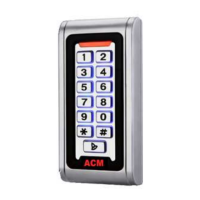
The ACM208/209 is a waterproof standalone keypad access controller, also capable of functioning as a Wiegand output keypad or card reader. Designed for both indoor and outdoor use, even in harsh environments, it features a robust, vandal-proof Zinc Alloy electroplated case available in bright silver or matt silver finish. Its electronics are fully potted, ensuring it is waterproof and conforms to IP68 standards.
This multi-function device supports up to 2000 users, offering access via Card, 4-digit PIN, or a combination of Card + PIN. It incorporates an inbuilt card reader compatible with 125KHz EM cards and 13.56MHz Mifare cards. The unit boasts several advanced features, including lock output current short circuit protection, Wiegand output, and a backlit keypad. These features make it suitable for various applications, from small shops and domestic households to commercial and industrial settings like factories, warehouses, laboratories, banks, and prisons.
The ACM208/209 offers comprehensive programming directly from the keypad.
 General
| Brand | ACM |
|---|---|
| Model | ACM208 |
| Category | IP Access Controllers |
| Language | English |

 To Next Page
