DVS-2500
27-
① Image Folder
- 32 picture folders, “Image000 ……Image031”.
- At most it can contain 1024 (32 x 32) pictures.
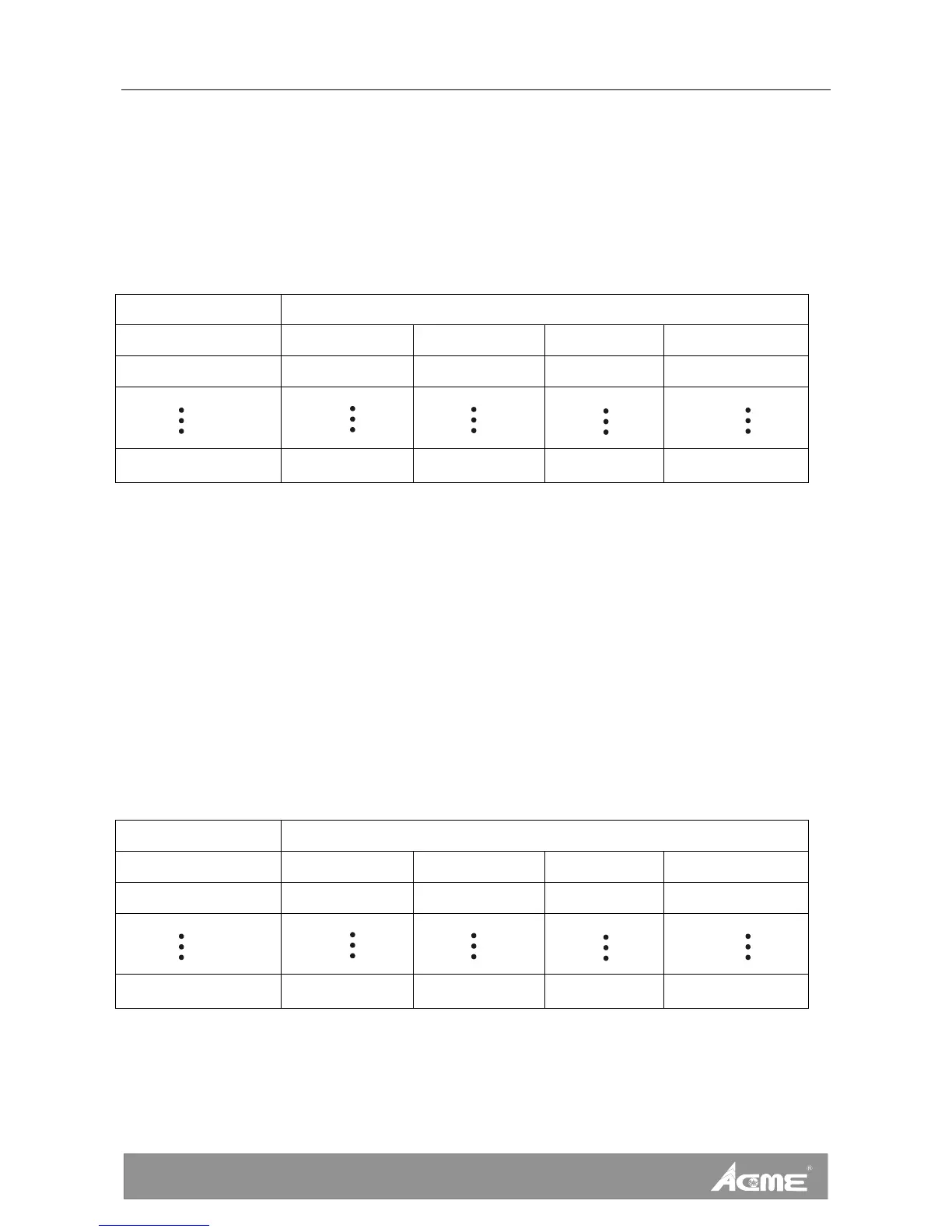
- Each folder can put at most 32 pictures in it. Pictures are changeable; please refer to the
following diagram to name your own files if you want to change pictures:
Folder File name
Image000 I000_000.jpg I000_001.jpg …… I000_031.jpg
Image001 I001_000.jpg I001_001.jpg …… I001_031.jpg
Image031 I031_000.jpg I031_001.jpg …… I031_031.jpg
For example: If you want to replace the picture No.1 in the “Image001” folder, rename your
own picture as “ I001_000.jpg ”, then copy it into the “Image001” folder of the memory card
to cover the older file.
② Video Folder
- 31 video folders, “Video001 ……Video031”. (Notice: The “Video000” folder is useless.)
- At most it can contain 992 (31 x 32) videos.
- Each folder can put at most 32 videos in it. Videos are changeable; please refer to the
following diagram to name your own files if you want to change videos:
Folder File name
Video001 V001_000.avi V001_001.avi …… V001_031.avi
Video002 V002_000.avi V002_001.avi …… V002_031.avi
Video031 V031_000.avi V031_001.avi …… V031_031.avi
For example: If you want to replace the video No.1 in the “Video001” folder, rename your
own picture as “V001_000.avi ”, then copy it into the “Video001” folder of the memory card
to cover the older file.









 To Next Page