5
Mounting the device
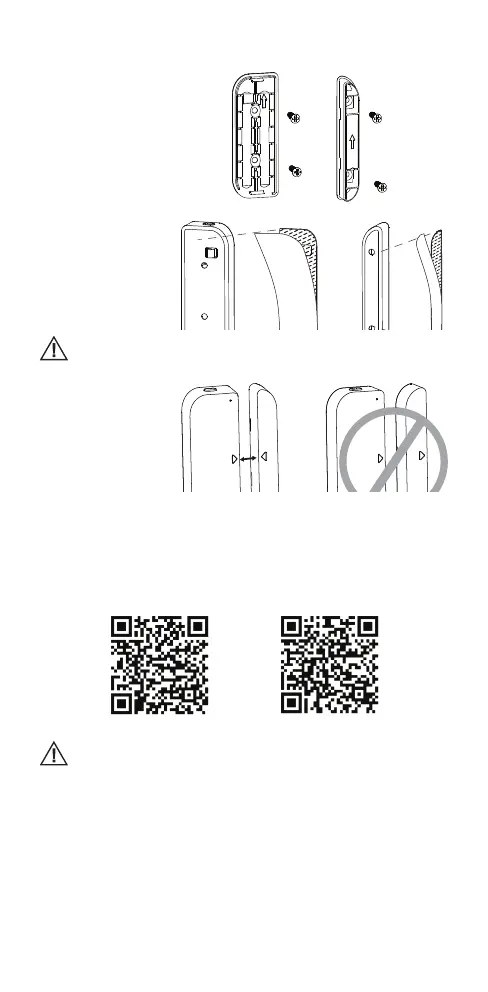
Use one of the following methods to mount the device to the door, wall or window.
1) Screw the mounting
plate and magnet
into the wall, door or
window frame:
2) Attach the double-
sided mounting tape
to the covers and put
it to the wall, door or
window frame:
Wipe clean the surface where the device will be mounted to as dust
particles can reduce the adhesion of double-sided mounting tape.
The orientation marks
on the sensor body and
the magnet must point
towards each other:
Setting up the device and its pairing
1) Insert 2 x AAA batteries and click the button; if the LED indicator turns blue, the
device is working properly. If not, the device is not working. Please check the
batteries.
2) Download the application from the Apple Store or Google Play Store by searching
for Simple Home, or you can quickly scan the QR codes below:
For Android devices For iOS devices
After installing the application click Allow on all permission requests.
3) Start the App and register an account with your email address / mobile number
and then log in with the use of the registered account.
4) Press and hold the button for 5 seconds to enter into the Wi-Fi conguration
mode. The LED indicator will blink rapidly (EZ mode) or slowly (AP mode). The
EZ mode connection is set as default in Wi-Fi conguration. Press and hold the
button for 5 seconds to enable the device to switch between the EZ mode and
AP mode.
5) Open the application and choose Add device, then select Door Sensor. Then
choose the connection mode and follow the instructions on your smartphone:



 To Next Page